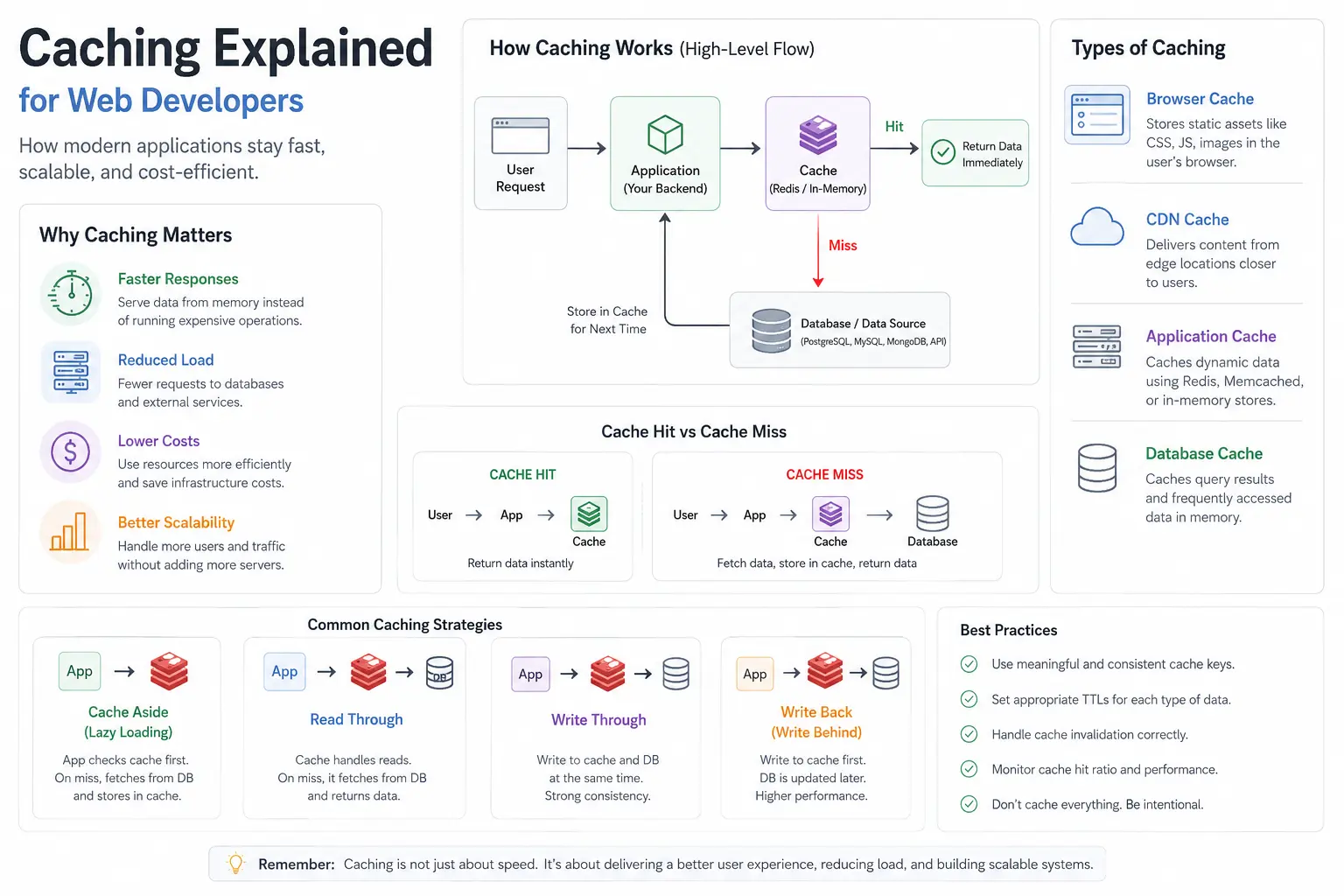
Caching Explained for Web Developers: How Modern Applications Stay Fast
Most applications do not become slow because the code is bad. They become slow because they keep doing expensive work over and over again.
Imagine an ecommerce homepage. Every visitor loads the same featured products, category menus, discounts, and navigation data.
If 10,000 people visit the page today, should your app run those same database queries 10,000 times?
Absolutely not.
That is where caching helps. It is one of the most practical performance tools in a web developer's toolkit. Whether you are building with Node.js, Express, PostgreSQL, MongoDB, Java, or .NET, caching shows up in real systems everywhere.
Fast-feeling websites are not always doing less work overall - they are just avoiding unnecessary work.
In this guide, you will learn:
- What caching is and why it matters
- Cache hits vs. cache misses
- Where caching lives in modern applications
- Why Redis is common for application caching
- Core caching patterns like Cache-Aside, Read-Through, Write-Through, and Write-Back
- Cache invalidation and TTL strategies
- A simple Node.js/Express example
- Common mistakes and when not to cache
- A decision framework for your own projects
- A few solid internal and external references
If you are newer to databases, start with Types of Databases in 2026 and PostgreSQL vs MongoDB vs Redis in 2026 for helpful context.
What Is Caching?
Caching is the process of temporarily storing frequently accessed data in a faster storage layer so future requests can be served quickly without repeating expensive operations.
It is like keeping your most-used tools on your desk instead of walking to the garage every single time. The original data in the garage - your database, external API, or heavy computation - still exists, but you have a convenient copy nearby.
Common things you might cache:
- Database query results like product listings or user profiles
- API responses from third parties
- Rendered HTML fragments or full pages
- Computationally expensive results like recommendations or analytics aggregates
- Session data, rate limits, and counters
The payoff is simple: faster response times, lower load on primary data sources, reduced infrastructure costs, and happier users.
Why Caching Matters: The Blog Article Example
Picture a simple blog. When someone visits an article, the backend might run a query like this:
1SELECT * FROM articles WHERE slug = 'caching-explained-for-web-developers';A single query might be fast - maybe 10 to 50 ms. But scale that to 1,000 or 100,000 concurrent readers and your database starts working much harder than it needs to.
The article content rarely changes. Caching lets you store the result once and serve it repeatedly. Your database breathes easier, users get near-instant loads, and your servers handle more traffic.
That is why caching is often one of the first major optimizations teams implement when scaling.
Cache Hit vs. Cache Miss
Two core ideas matter here:
Cache Hit
The data is already in the cache. Return it immediately. No database query needed.
Cache Miss
The data is not in the cache. The app fetches it from the source, stores it in the cache, and returns it. The first request is slower; the next ones are fast.
A good caching strategy aims for more hits and handles misses cleanly.
Where Caching Lives in Modern Applications
Caching is not just Redis. It happens at multiple layers:
1. Browser Cache
Browsers store images, CSS, JavaScript, and fonts locally. HTTP headers like Cache-Control, ETag, and Expires tell the browser how long to keep assets around.
2. CDN Cache
CDNs such as Cloudflare, AWS CloudFront, or Fastly store static assets closer to users geographically. That reduces latency and removes work from your origin server.
3. Application Cache
This is where your backend logic caches hot data. Redis and Memcached are common choices.
4. Database Cache
Databases also cache hot pages and frequently accessed data in memory to avoid disk reads.
Layered caching is common in high-scale systems.
Why Redis Is the Go-To for Application Caching
Redis is not the only option, but it is popular for good reasons:
- In-memory storage means very low latency
- It supports strings, hashes, lists, sets, sorted sets, and streams
- It has built-in TTL support and expiration commands
- It works well for sessions, queues, rate limits, and hot data
Typical flow:
1User Request -> Express API -> Check Redis -> Hit? Return : Query DB -> Store in Redis -> ReturnThat simple flow can dramatically reduce database load.
Caching Patterns: How Pros Structure It
There are several established patterns. Knowing them helps you choose the right one.
Cache-Aside (Lazy Loading) - Most Common
The application manages cache logic directly.
- Check the cache for the key.
- Hit -> return.
- Miss -> fetch from the database, store in cache, return.
Pros: Simple, flexible, and easy to reason about.
Cons: Your app code handles orchestration, and misses can cause traffic spikes.
Read-Through
The cache layer handles misses for you. If the key is missing, the cache fetches from the source.
Write-Through
Writes go to both cache and database synchronously. That improves consistency but adds write latency.
Write-Back (Write-Behind)
Writes go to cache first, then sync to the database later. This is fast, but it carries more risk if the cache fails before sync.
Write-Around
Writes skip the cache and go straight to the database. Useful when the written data is unlikely to be read soon.
Choose based on your read/write ratio, consistency needs, and tolerance for stale data.
Cache Invalidation: The Hardest Problem in Caching
Cache invalidation means removing or updating stale cache entries when the underlying data changes.
Useful strategies:
- TTL: Set an expiration time and let old entries fall out naturally
- Event-based invalidation: Delete keys when the database changes
- Versioning: Put a version number in the cache key
- Write-through or write-back: Keep cache and database aligned by design
The practical rule is simple: combine TTL with explicit invalidation when the data is important.
TTL Strategies in Practice
- Static content: long TTLs, often with a CDN
- User-specific data: shorter TTLs
- Fast-changing data like prices or inventory: very short TTLs or no cache
- Redis supports expiration through commands like
EXPIREandSETwithEX
Practical Redis Example with Node.js / Express
Here is a simple cache-aside implementation using Express and Redis.
First, install dependencies:
1npm install express ioredisThen wire up a basic route:
1const express = require('express');
2const Redis = require('ioredis');
3
4const app = express();
5const redis = new Redis(process.env.REDIS_URL || 'redis://localhost:6379');
6
7async function getArticleFromDb(slug) {
8  // Replace this with your real database query.
9  return {
10    slug,
11    title: 'Caching Explained for Web Developers',
12    body: 'This would come from your database.',
13  };
14}
15
16app.get('/articles/:slug', async (req, res) => {
17  const { slug } = req.params;
18  const cacheKey = `article:${slug}`;
19
20  try {
21    const cached = await redis.get(cacheKey);
22    if (cached) {
23      return res.json({ source: 'cache', data: JSON.parse(cached) });
24    }
25
26    const article = await getArticleFromDb(slug);
27    await redis.set(cacheKey, JSON.stringify(article), 'EX', 300);
28
29    return res.json({ source: 'database', data: article });
30  } catch (error) {
31    console.error('Cache lookup failed:', error);
32
33    const article = await getArticleFromDb(slug);
34    return res.json({ source: 'database', data: article });
35  }
36});
37
38app.listen(3000, () => {
39  console.log('Server running on http://localhost:3000');
40});
This keeps the cache-aside pattern easy to follow. The EX option gives the key a TTL, and the official Redis EXPIRE command reference explains the expiration behavior in more detail. If you want to understand the route shape, the Express routing guide is the next stop.
If you update the article later, invalidate the cache key too:
1await redis.del(`article:${slug}`);Common Caching Mistakes
- No invalidation strategy leads to stale data.
- Over-caching wastes memory and adds complexity.
- Caching everything creates noise, not speed.
- Ignoring cache stampedes can overload the database.
- No monitoring means you cannot tell whether the cache is helping.
- Assuming perfect consistency is a mistake.
When Not to Cache
- Highly sensitive or real-time data like bank balances or live scores
- Data that changes constantly and must always be fresh
- Very low traffic pages where caching does not pay off
- Large, infrequently accessed data that would just thrash the cache
- POST, PUT, and DELETE responses in most normal applications
Always measure before and after.
Real-World Pattern
At production scale, the pattern is usually the same: use a CDN for static assets, Redis for hot dynamic data, and the database as the source of truth.
That keeps repeated work away from the database and makes the app feel much faster under load.
Decision Framework: Should You Cache This?
Ask yourself:
- How often is this data read versus written?
- What is the cost of stale data?
- Can I tolerate the extra complexity?
- Do I have good monitoring?
- What happens if the cache fails?
Start simple with Cache-Aside and TTL, then measure and iterate.
FAQ
What is caching in web development?
Caching is the process of temporarily storing frequently accessed data so applications can serve requests faster without repeating expensive operations.
Why is Redis commonly used for caching?
Redis stores data in memory, making it very fast for frequently accessed information such as API responses, sessions, and database query results.
What is a cache hit?
A cache hit occurs when requested data already exists in the cache and can be returned immediately without accessing the original data source.
What is cache invalidation?
Cache invalidation is the process of removing or updating outdated cache entries so users do not see stale data.
Additional questions worth thinking about:
- How do I handle cache in distributed systems? Use shared storage, replication, or centralized invalidation.
- Browser cache or server cache? Use browser caching for static assets and server caching for dynamic data.
- Memory cache or disk cache? Memory is faster; disk is better for persistence and larger datasets.
Conclusion: Cache Smart, Not Blindly
Caching is a superpower for building fast, scalable web applications - but like any tool, it needs thoughtfulness. Start with the basics, measure everything, and evolve your strategy as your app grows.
The goal is not zero database hits. It is sustainable performance that keeps users happy and costs under control.
Ready to implement? Start with one high-traffic endpoint, add caching, monitor hit rates, and tune from there.
Internal Links for Further Reading:
- Database Roadmap for Web Developers in 2026
- Types of Databases in 2026
- PostgreSQL vs MongoDB vs Redis in 2026
- API Rate Limiting Explained
External References:
What caching challenges have you faced in your projects? Drop a comment below. I read every one.
Happy coding and faster apps!
GitHub Discussions
Discuss this article