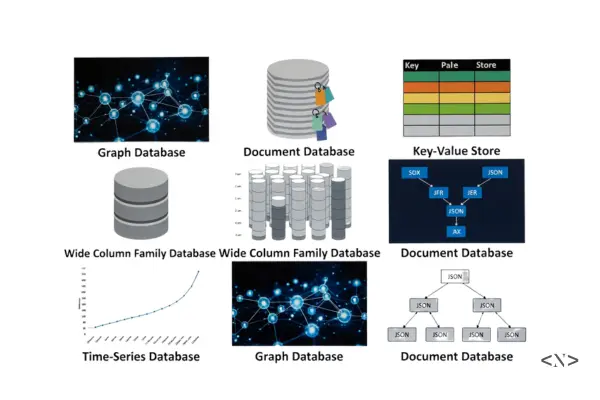
Types of Databases in 2026: A Practical Guide for Developers
If you're serious about building real applications, databases stop being an abstract concept very quickly.
At some point, you'll need to decide how data is stored, accessed, secured, and scaled — and that's where database types matter.
In the previous article, Database Roadmap for Web Developers in 2026, we focused on what to learn and in what order.
This post answers a simpler but critical question:
What kinds of databases actually exist?
Which Modern Database Is Right for Your Use Case?
and
Why do developers choose one over another?
No theory overload. No academic definitions. Just practical clarity.
Why There Are So Many Database Types
Different applications have different problems to solve.
- A banking app cares deeply about accuracy and consistency
- A social media app cares about speed and scale
- A monitoring system cares about time-based data
- A startup MVP cares about flexibility and fast development
One database cannot optimize for everything.
That's why multiple database types exist — each designed for a specific set of trade-offs.
Relational Databases (SQL)
Definition: Relational databases store data in structured tables with rows and columns, using relationships between tables to organize information. They follow ACID properties (Atomicity, Consistency, Isolation, Durability) to ensure data integrity.
Key Characteristics
- Schema-first approach: Define table structure before adding data
- ACID compliance: Guarantees reliable transactions
- SQL language: Standardized query language across platforms
- Referential integrity: Enforces relationships between tables
Basic SQL Syntax Examples
1-- Create a table
2CREATE TABLE users (
3    id SERIAL PRIMARY KEY,
4    name VARCHAR(100) NOT NULL,
5    email VARCHAR(255) UNIQUE,
6    created_at TIMESTAMP DEFAULT NOW()
7);
8
9-- Insert data
10INSERT INTO users (name, email)
11VALUES ('John Doe', 'john@example.com');
12
13-- Query data
14SELECT name, email FROM users
15WHERE created_at > '2026-01-01';
16
17-- Join tables
18SELECT u.name, o.total
19FROM users u
20JOIN orders o ON u.id = o.user_id;
Popular Relational Databases
- PostgreSQL: Advanced open-source database with JSON support
- MySQL: Widely-used, fast, and reliable
- SQL Server: Microsoft's enterprise database solution
- SQLite: Lightweight, file-based database
- Oracle Database: Enterprise-grade with advanced features
When to Choose Relational Databases
- E-commerce platforms: Orders, payments, inventory management
- Financial applications: Banking, accounting, transactions
- User management systems: Authentication, profiles, permissions
- Content management: Blogs, news sites with structured content
- Enterprise applications: CRM, ERP, HR systems
SQL Database Advantages
- Data consistency: ACID properties ensure reliable transactions
- Mature ecosystem: Extensive tooling and community support
- Standardized queries: SQL works across different databases
- Complex relationships: Excellent for normalized data structures
SQL Database Disadvantages
- Rigid schema: Difficult to change structure after deployment
- Vertical scaling: Limited horizontal scaling capabilities
- Performance: Can be slower for simple read/write operations
Relational databases remain the backbone of most production applications. PostgreSQL has become the preferred choice for modern web applications due to its advanced features, JSON support, and excellent performance.
Learning Resources
NoSQL Databases
Definition: NoSQL (Not Only SQL) databases are non-relational databases that store data in flexible, schema-less formats. They prioritize scalability, performance, and flexibility over strict consistency.
NoSQL Key Characteristics
- Schema flexibility: No predefined structure required
- Horizontal scaling: Designed to scale across multiple servers
- High performance: Optimized for specific use cases
- Various data models: Document, key-value, column-family, graph
NoSQL vs SQL Comparison
| Feature | SQL Databases | NoSQL Databases |
|---|---|---|
| Schema | Fixed, predefined | Flexible, dynamic |
| Scaling | Vertical (scale up) | Horizontal (scale out) |
| Consistency | ACID compliant | Eventually consistent |
| Query Language | SQL standard | Database-specific |
| Use Cases | Complex relationships | High-volume, simple queries |
NoSQL databases excel when data structure changes frequently, when you need to handle massive scale, or when development speed is prioritized over data consistency.
Document Databases
Definition: Document databases store data as JSON-like documents (BSON, JSON, XML) instead of rows and columns. Each document can have a different structure, making them highly flexible.
Document Database Syntax Examples
1// MongoDB - Insert a document
2db.users.insertOne({
3    name: "John Doe",
4    email: "john@example.com",
5    profile: {
6        age: 30,
7        interests: ["coding", "gaming"],
8        address: {
9            city: "New York",
10            country: "USA"
11        }
12    },
13    createdAt: new Date()
14});
15
16// Query documents
17db.users.find({
18    "profile.age": { $gte: 25 },
19    "profile.interests": "coding"
20});
21
22// Update document
23db.users.updateOne(
24    { email: "john@example.com" },
25    { $set: { "profile.age": 31 } }
26);
Popular Document Databases
- MongoDB: Most popular, rich query capabilities
- CouchDB: RESTful API, built-in replication
- Amazon DocumentDB: MongoDB-compatible, fully managed
- Firebase Firestore: Real-time, serverless document database
Document Database Use Cases
- Content Management Systems: Blogs, news sites, wikis
- Product Catalogs: E-commerce with varying product attributes
- User Profiles: Social media, gaming platforms
- Real-time Applications: Chat apps, collaborative tools
- IoT Data Collection: Sensor data with varying structures
Document Database Advantages
- Flexible schema: Easy to modify data structure
- Natural fit for JSON: Works seamlessly with JavaScript/Node.js
- Horizontal scaling: Built for distributed systems
- Rapid development: No need to define schema upfront
Document Database Disadvantages
- No ACID transactions: Limited consistency guarantees
- Data duplication: May require storing redundant information
- Complex queries: Limited JOIN capabilities
Learning Resources
Key-Value Databases
Definition: Key-value databases store data as simple key-value pairs, like a giant hash table or dictionary. They offer the fastest read/write operations among all database types.
Key-Value Database Syntax Examples
1# Redis - Basic operations
2SET user:1001 "John Doe"
3GET user:1001
4
5# Store JSON data
6SET user:1001:profile '{"name":"John","age":30}'
7
8# Set expiration (TTL)
9SETEX session:abc123 3600 "user_data"
10
11# Increment counters
12INCR page_views:homepage
13INCRBY user:1001:points 50
14
15# Lists and sets
16LPUSH notifications:user1001 "New message"
17SADD user:1001:interests "coding" "gaming"1# Python with Redis
2import redis
3
4r = redis.Redis(host='localhost', port=6379)
5
6# Basic operations
7r.set('user:1001', 'John Doe')
8name = r.get('user:1001')
9
10# Hash operations
11r.hset('user:1001', mapping={
12 'name': 'John Doe',
13 'email': 'john@example.com',
14 'age': 30
15})Popular Key-Value Databases
- Redis: In-memory, supports complex data types
- Amazon DynamoDB: Fully managed, serverless
- Riak: Distributed, fault-tolerant
- Memcached: Simple, high-performance caching
- Etcd: Distributed key-value store for configuration
Key-Value Use Cases
- Caching Layer: API responses, database query results
- Session Storage: User login sessions, shopping carts
- Rate Limiting: API throttling, request counting
- Real-time Features: Live counters, leaderboards
- Configuration Management: Application settings, feature flags
- Message Queues: Simple pub/sub messaging
Key-Value Advantages
- Extreme performance: Fastest read/write operations
- Simple model: Easy to understand and implement
- Horizontal scaling: Excellent distribution capabilities
- Low latency: Perfect for real-time applications
Key-Value Disadvantages
- Limited queries: No complex filtering or joins
- No relationships: Cannot model complex data relationships
- Memory constraints: In-memory stores limited by RAM
Almost every large-scale application uses a key-value database for caching, sessions, or real-time features alongside their primary database.
Learning Resources
Graph Databases
Definition: Graph databases store data as nodes (entities) and edges (relationships), making them perfect for applications where connections between data points are as important as the data itself.
Graph Database Concepts
- Nodes: Entities (users, products, locations)
- Edges: Relationships (follows, bought, located_in)
- Properties: Attributes on nodes and edges
- Labels: Categories for nodes
Graph Database Syntax Examples
1// Cypher (Neo4j) - Create nodes and relationships
2CREATE (john:Person {name: 'John Doe', age: 30})
3CREATE (jane:Person {name: 'Jane Smith', age: 28})
4CREATE (company:Company {name: 'Tech Corp'})
5
6// Create relationships
7CREATE (john)-[:FRIENDS_WITH {since: '2020-01-01'}]->(jane)
8CREATE (john)-[:WORKS_FOR {position: 'Developer'}]->(company)
9
10// Find friends of friends
11MATCH (person:Person)-[:FRIENDS_WITH]->(friend)-[:FRIENDS_WITH]->(fof)
12WHERE person.name = 'John Doe'
13RETURN fof.name
14
15// Recommendation query
16MATCH (user:Person {name: 'John Doe'})-[:FRIENDS_WITH]->(friend)
17      -[:LIKES]->(item:Product)
18WHERE NOT (user)-[:LIKES]->(item)
19RETURN item.name, COUNT(friend) as recommendations
20ORDER BY recommendations DESC
Popular Graph Databases
- Neo4j: Most popular, Cypher query language
- Amazon Neptune: Fully managed, supports multiple graph models
- ArangoDB: Multi-model with graph capabilities
- OrientDB: Document-graph hybrid database
- TigerGraph: High-performance analytics
Perfect Use Cases
- Social Networks: Friend connections, content sharing
- Recommendation Engines: "People who bought this also bought"
- Fraud Detection: Identifying suspicious transaction patterns
- Knowledge Graphs: Wikipedia, search engines
- Network Analysis: IT infrastructure, supply chains
- Route Planning: GPS navigation, logistics optimization
Real-World Examples
- LinkedIn: Professional network connections
- Facebook: Social graph for friend suggestions
- Netflix: Movie recommendations based on viewing patterns
- Uber: Route optimization and driver matching
Advantages
- Relationship queries: Extremely fast traversal of connections
- Intuitive modeling: Natural representation of connected data
- Pattern matching: Excellent for detecting complex relationships
- Real-time insights: Fast analysis of network structures
Disadvantages
- Learning curve: Requires understanding graph theory concepts
- Limited use cases: Not suitable for all application types
- Scaling challenges: Complex to distribute across servers
Learning Resources
Time-Series Databases
Definition: Time-series databases are specialized for storing and analyzing time-stamped data points. They excel at handling massive volumes of data where time is the primary index.
Time-Series Key Characteristics
- Time-based indexing: Optimized for chronological data
- High ingestion rates: Handle millions of data points per second
- Compression: Efficient storage of repetitive time-series data
- Retention policies: Automatic data lifecycle management
Time-Series Database Syntax Examples
1-- TimescaleDB (PostgreSQL extension)
2CREATE TABLE sensor_data (
3    time TIMESTAMPTZ NOT NULL,
4    device_id INTEGER,
5    temperature DOUBLE PRECISION,
6    humidity DOUBLE PRECISION
7);
8
9-- Convert to hypertable for time-series optimization
10SELECT create_hypertable('sensor_data', 'time');
11
12-- Insert time-series data
13INSERT INTO sensor_data VALUES
14    (NOW(), 1, 23.5, 45.2),
15    (NOW(), 2, 24.1, 43.8);
16
17-- Time-based queries with aggregation
18SELECT
19    time_bucket('1 hour', time) AS hour,
20    device_id,
21    AVG(temperature) as avg_temp
22FROM sensor_data
23WHERE time > NOW() - INTERVAL '24 hours'
24GROUP BY hour, device_id
25ORDER BY hour DESC;1# InfluxDB - Line Protocol
2# measurement,tag1=value1,tag2=value2 field1=value1,field2=value2 timestamp
3temperature,location=office,sensor=A temperature=23.5,humidity=45.2 1640995200000000000
4
5# InfluxQL queries
6SELECT MEAN(temperature)
7FROM temperature
8WHERE time > now() - 1h
9GROUP BY time(10m), locationPopular Time-Series Databases
- InfluxDB: Purpose-built, high performance
- TimescaleDB: PostgreSQL extension, SQL familiar
- Prometheus: Monitoring and alerting focused
- Amazon Timestream: Fully managed, serverless
- Apache Druid: Real-time analytics at scale
Perfect Use Cases
- IoT Monitoring: Sensor data from devices and machines
- Application Performance: Response times, error rates, throughput
- Financial Markets: Stock prices, trading volumes, market data
- DevOps Monitoring: Server metrics, log analysis
- Industrial Systems: Manufacturing data, energy consumption
- Weather Stations: Temperature, humidity, pressure readings
Real-World Applications
- Tesla: Vehicle telemetry and battery monitoring
- Netflix: Streaming quality and performance metrics
- Uber: Real-time location and trip data
- Trading Platforms: High-frequency market data
Advantages
- Optimized performance: Extremely fast for time-based queries
- Efficient storage: Built-in compression for time-series data
- Scalability: Handle massive data ingestion rates
- Analytics features: Built-in functions for time-series analysis
Disadvantages
- Specialized use case: Not suitable for general application data
- Learning curve: Requires understanding time-series concepts
- Limited relationships: Not designed for complex data relationships
Learning Resources
In-Memory Databases
Definition: In-memory databases store data entirely in RAM (Random Access Memory) instead of traditional disk storage, providing ultra-fast data access with microsecond response times.
In-Memory Key Characteristics
- RAM-based storage: All data kept in memory
- Ultra-fast access: Microsecond response times
- Volatile by default: Data lost on restart (unless persisted)
- High throughput: Millions of operations per second
In-Memory Database Examples
1# Redis as in-memory database
2import redis
3
4r = redis.Redis(host='localhost', port=6379)
5
6# Ultra-fast operations
7r.set('counter', 0)
8r.incr('counter')  # Atomic increment
9r.get('counter')   # Returns '1'
10
11# Complex data structures in memory
12r.lpush('queue', 'task1', 'task2')
13r.rpop('queue')    # FIFO queue operations
14
15# Pub/Sub for real-time messaging
16r.publish('notifications', 'New message')
Popular In-Memory Databases
- Redis: Most popular, rich data structures
- Memcached: Simple key-value caching
- SAP HANA: Enterprise in-memory SQL database
- Apache Ignite: Distributed in-memory platform
- Hazelcast: Distributed computing platform
Common Use Cases
- Application Caching: Frequently accessed data
- Session Storage: User login sessions, shopping carts
- Real-time Analytics: Live dashboards, metrics
- Gaming Leaderboards: High-score tracking
- Financial Trading: Low-latency transaction processing
- Message Queues: High-throughput messaging systems
Advantages
- Extreme performance: Fastest possible data access
- Low latency: Perfect for real-time applications
- High concurrency: Handle many simultaneous operations
- Simple scaling: Easy to add more memory
Disadvantages
- Memory cost: RAM is expensive compared to disk storage
- Data volatility: Risk of data loss on system failure
- Size limitations: Limited by available RAM
- Complexity: Requires careful memory management
Learning Resources
Cloud and Serverless Databases
Definition: Cloud databases are fully managed database services that handle infrastructure, scaling, backups, and maintenance automatically, allowing developers to focus on application logic.
Cloud Database Key Features
- Managed infrastructure: No server management required
- Auto-scaling: Automatically adjusts to demand
- Built-in security: Encryption, access controls, compliance
- Global distribution: Multi-region deployment capabilities
Cloud Database Examples
1// Supabase - PostgreSQL with real-time features
2import { createClient } from '@supabase/supabase-js'
3
4const supabase = createClient(url, key)
5
6// Insert data
7const { data, error } = await supabase
8  .from('users')
9  .insert({ name: 'John Doe', email: 'john@example.com' })
10
11// Real-time subscriptions
12supabase
13  .channel('users')
14  .on('postgres_changes', { event: 'INSERT', schema: 'public', table: 'users' },
15    payload => console.log('New user:', payload))
16 .subscribe()1// Firebase Firestore - NoSQL document database
2import { initializeApp } from 'firebase/app'
3import { getFirestore, collection, addDoc } from 'firebase/firestore'
4
5const db = getFirestore(app)
6
7// Add document
8await addDoc(collection(db, 'users'), {
9 name: 'John Doe',
10 email: 'john@example.com',
11 timestamp: serverTimestamp()
12})Popular Cloud Databases
- Supabase: Open-source Firebase alternative with PostgreSQL
- Firebase: Google's real-time NoSQL platform
- AWS DynamoDB: Serverless key-value and document database
- MongoDB Atlas: Fully managed MongoDB in the cloud
- PlanetScale: Serverless MySQL platform
Perfect Use Cases
- Rapid prototyping: Quick setup without infrastructure
- Serverless applications: Perfect for JAMstack and edge computing
- Real-time apps: Built-in real-time synchronization
- Global applications: Multi-region data distribution
- Small to medium projects: Cost-effective for moderate scale
Advantages
- Zero maintenance: No database administration required
- Instant scaling: Automatic capacity adjustments
- Built-in features: Authentication, real-time sync, file storage
- Developer experience: Simple APIs and SDKs
Disadvantages
- Vendor lock-in: Difficult to migrate between providers
- Cost at scale: Can become expensive for large applications
- Limited customization: Less control over database configuration
Learning Resources
Column-Family Databases
Definition: Column-family databases store data in column families (groups of related columns) rather than rows, optimizing for write-heavy workloads and analytical queries.
Column-Family Key Characteristics
- Column-oriented storage: Data stored by columns, not rows
- Wide rows: Can have millions of columns per row
- Eventual consistency: Prioritizes availability over consistency
- Horizontal scaling: Designed for distributed systems
Column-Family Syntax Examples
1-- Cassandra CQL (Cassandra Query Language)
2CREATE TABLE user_activity (
3    user_id UUID,
4    timestamp TIMESTAMP,
5    activity_type TEXT,
6    details MAP<TEXT, TEXT>,
7    PRIMARY KEY (user_id, timestamp)
8) WITH CLUSTERING ORDER BY (timestamp DESC);
9
10-- Insert data
11INSERT INTO user_activity (user_id, timestamp, activity_type, details)
12VALUES (uuid(), now(), 'login', {'ip': '192.168.1.1', 'device': 'mobile'});
13
14-- Query recent activity
15SELECT * FROM user_activity
16WHERE user_id = ?
17AND timestamp > ?
18LIMIT 100;
Popular Column-Family Databases
- Apache Cassandra: Highly scalable, fault-tolerant
- Amazon DynamoDB: Managed NoSQL with column-family features
- HBase: Hadoop-based, real-time read/write access
- ScyllaDB: High-performance Cassandra alternative
Perfect Use Cases
- Time-series data: IoT sensors, application logs
- Content management: Media metadata, user-generated content
- Messaging systems: Chat applications, notification systems
- Analytics platforms: Event tracking, user behavior analysis
Advantages
- Massive scale: Handle petabytes of data
- High availability: No single point of failure
- Write performance: Optimized for high write throughput
- Flexible schema: Add columns without downtime
Disadvantages
- Complex queries: Limited JOIN and aggregation support
- Eventual consistency: Data may be temporarily inconsistent
- Learning curve: Different mental model from SQL
Learning Resources
NewSQL Databases
Definition: NewSQL databases combine the ACID guarantees of traditional SQL with the horizontal scalability of NoSQL. They solve the modern challenge of maintaining data consistency while scaling globally.
NewSQL Key Features
- Distributed ACID transactions: Consistency across multiple servers
- SQL compatibility: Use familiar SQL syntax and tools
- Automatic sharding: Data distributed transparently
- High availability: Built-in fault tolerance and replication
NewSQL Database Examples
1-- CockroachDB - Standard SQL with global distribution
2CREATE TABLE users (
3    id UUID PRIMARY KEY DEFAULT gen_random_uuid(),
4    name STRING NOT NULL,
5    email STRING UNIQUE,
6    region STRING,
7    created_at TIMESTAMPTZ DEFAULT now()
8);
9
10-- Partition data by region for performance
11ALTER TABLE users PARTITION BY LIST (region) (
12    PARTITION us VALUES IN ('us-east', 'us-west'),
13    PARTITION eu VALUES IN ('eu-west', 'eu-central')
14);
15
16-- Transactions work across distributed nodes
17BEGIN;
18INSERT INTO accounts (id, balance) VALUES (1, 1000);
19INSERT INTO accounts (id, balance) VALUES (2, 500);
20COMMIT;
Popular NewSQL Databases
- CockroachDB: PostgreSQL-compatible, cloud-native
- Google Cloud Spanner: Globally distributed, fully managed
- YugabyteDB: Open-source, PostgreSQL and Cassandra APIs
- TiDB: MySQL-compatible, horizontal scaling
- VoltDB: In-memory, high-throughput transactions
When to Choose NewSQL
- Global applications: Multi-region deployments
- Financial services: Need ACID compliance at scale
- E-commerce platforms: High transaction volumes
- Gaming platforms: Global leaderboards and transactions
- IoT applications: Massive scale with consistency requirements
Advantages
- Best of both worlds: SQL familiarity + NoSQL scalability
- Global consistency: ACID transactions across regions
- Automatic scaling: No manual sharding required
- High availability: Built-in disaster recovery
Disadvantages
- Complexity: More complex than traditional databases
- Cost: Can be expensive for smaller applications
- Latency: Global consistency can impact performance
Learning Resources
Multi-Model Databases
Definition: Multi-model databases support multiple data models (document, graph, key-value, relational) in a single database engine, eliminating the need for separate systems.
Multi-Model Key Features
- Unified platform: Multiple data models in one system
- Polyglot persistence: Different models for different use cases
- ACID transactions: Consistency across different data models
- Single query language: Often extends SQL for all models
Multi-Model Examples
1-- ArangoDB - Document, graph, and key-value in one
2// Insert document
3INSERT { name: "John", age: 30, city: "NYC" } INTO users
4
5// Create graph relationship
6INSERT { _from: "users/john", _to: "users/jane", type: "friend" } INTO relationships
7
8// Graph traversal query
9FOR user IN 1..2 OUTBOUND "users/john" relationships
10  RETURN user.name
Popular Multi-Model Databases
- ArangoDB: Document, graph, and key-value
- OrientDB: Document and graph hybrid
- Amazon Neptune: Graph with RDF support
- CosmosDB: Multiple APIs (SQL, MongoDB, Cassandra, Gremlin)
Perfect Use Cases
- Complex applications: Need multiple data patterns
- Microservices: Different services need different models
- Data integration: Combining structured and unstructured data
- Rapid development: Avoid managing multiple databases
Advantages
- Simplified architecture: One database for multiple needs
- Consistent tooling: Single management interface
- Cross-model queries: Join data across different models
- Reduced complexity: Fewer systems to maintain
Disadvantages
- Jack of all trades: May not excel at any specific model
- Vendor lock-in: Harder to migrate specialized workloads
- Performance: May not match specialized databases
Learning Resources
How Developers Actually Use Databases in Practice
In real-world applications, it's common to see combinations like:
Typical Database Architecture
┌─────────────────┐    ┌─────────────────┐    ┌─────────────────┐
│   PostgreSQL    │    │      Redis      │    │   Elasticsearch │
│  (Primary Data) │    │   (Caching)     │    │   (Search)      │
└─────────────────┘    └─────────────────┘    └─────────────────┘
         │                       │                       │
         └───────────────────────┼───────────────────────┘
                                 │
                        ┌─────────────────┐
                        │    Application  │
                        │      Server     │
                        └─────────────────┘
Common Patterns
- PostgreSQL for core application data and transactions
- Redis for caching, sessions, and real-time features
- Elasticsearch for full-text search and analytics
- S3/CloudFlare for file storage and CDN
- InfluxDB for metrics and monitoring data
Understanding database types allows you to design these systems intentionally instead of guessing.
Database Selection Decision Tree
Start: What type of data do you have?

├── Structured, relational data
│   ├── Need global scale? → NewSQL (CockroachDB)
│   └── Traditional scale? → SQL (PostgreSQL)
│
├── Flexible, document-like data
│   ├── Need real-time sync? → Firebase/Supabase
│   └── Self-managed? → MongoDB
│
├── Simple key-value pairs
│   ├── Need persistence? → DynamoDB
│   └── Caching only? → Redis/Memcached
│
├── Connected/relationship data
│   └── Graph Database (Neo4j)
│
├── Time-stamped data
│   └── Time-series (InfluxDB/TimescaleDB)
│
└── Multiple data patterns
    └── Multi-model (ArangoDB)
Frequently Asked Questions
Is SQL still relevant in 2026?
Yes — very much. Most production systems still rely on relational databases, and SQL remains one of the most valuable skills for developers. Modern SQL databases like PostgreSQL have evolved to handle JSON, full-text search, and other NoSQL features.
Should beginners start with NoSQL because it's "easier"?
Not necessarily. Relational databases teach structure and data discipline early, which makes learning other databases easier later. Start with PostgreSQL to understand fundamentals, then explore NoSQL for specific use cases.
Can one application use multiple databases?
Absolutely. In fact, many scalable systems are designed this way to optimize performance and reliability. This approach is called "polyglot persistence" and is considered a best practice for complex applications.
Are cloud databases safe for production use?
Yes, when configured properly. They are widely used in production and often provide better reliability than self-hosted solutions. Major companies like Airbnb, Spotify, and Netflix rely heavily on cloud databases.
Do I need to learn every database type?
No. You need to understand why each type exists and when to use them, not master all of them. Focus on one SQL database (PostgreSQL) and one NoSQL database (MongoDB or Redis) initially.
How do I choose between similar databases?
Consider these factors:
- Team expertise: What does your team already know?
- Ecosystem: What tools and libraries are available?
- Scaling requirements: Current and future data volume
- Budget: Licensing, hosting, and operational costs
- Support: Community vs. enterprise support needs
What You Should Learn Next
If this is your second database article, the natural next steps are:
- SQL vs NoSQL with real examples - Practical comparison with code
- PostgreSQL deep dive for web developers - Hands-on tutorial
- Designing database schemas for real apps - Best practices guide
- Connecting databases to Next.js securely - Full-stack implementation
- Database performance optimization - Query tuning and indexing
All of this is already mapped out in my Database Roadmap for Web Developers in 2026.
Final Thoughts
Databases are not about memorizing tools.
They're about making informed decisions.
Once you understand the different types and what problems they solve, everything else — performance, scalability, and architecture — starts to make sense.
The key is to:
- Start simple with PostgreSQL for most use cases
- Add specialized databases when you have specific needs
- Learn the trade-offs rather than following trends
- Build real projects to understand practical implications
In the next post, we'll break down SQL vs NoSQL using real application scenarios, not opinions.
Until then, build something real and let the database teach you the rest.
GitHub Discussions
Discuss this article