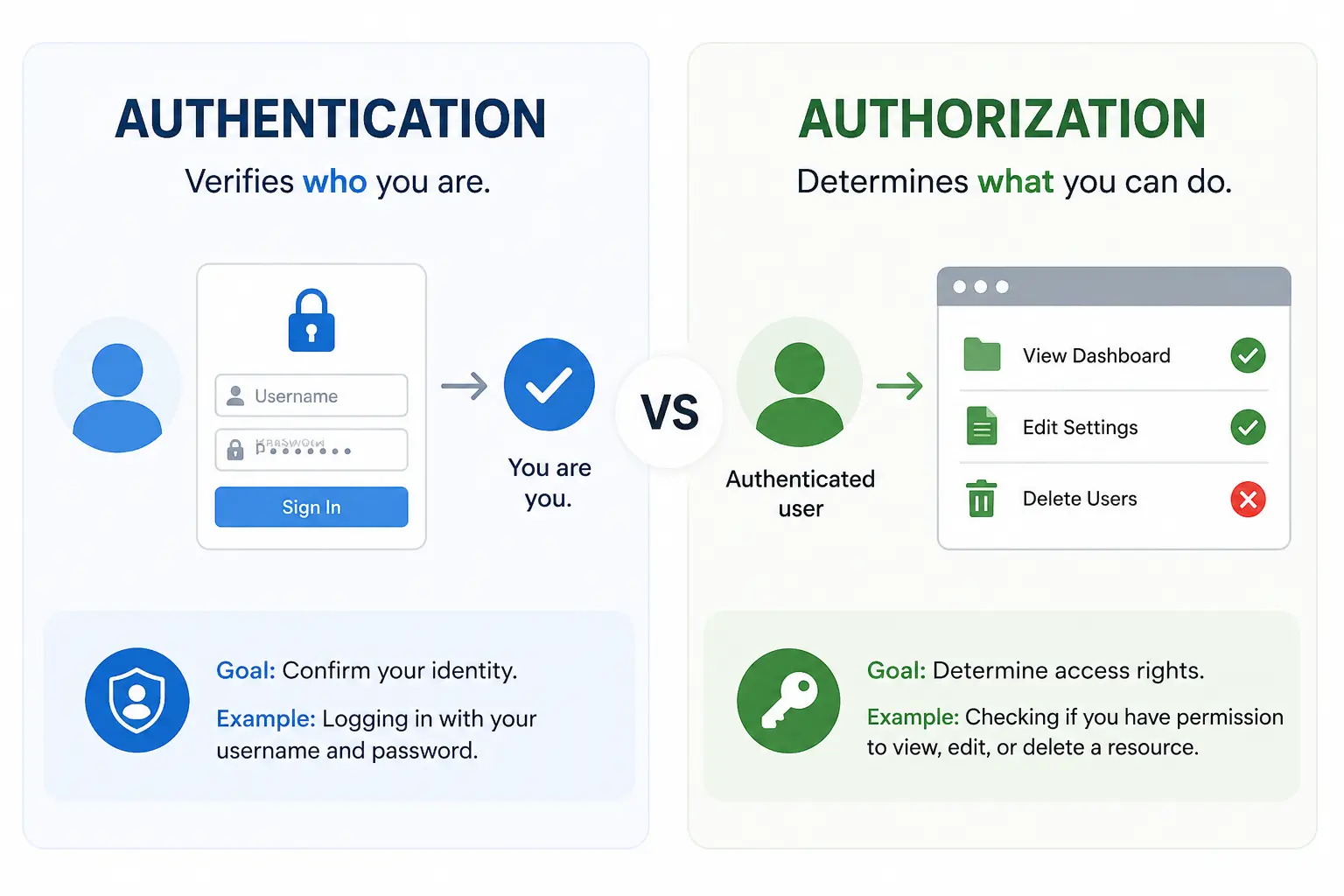
Authentication and authorization sound similar, so beginners often mix them up. That confusion creates real problems when you start building login systems, dashboards, admin panels, API routes, and paid features.
The short version is simple:
- Authentication answers: "Who are you?"
- Authorization answers: "What are you allowed to do?"
If a user logs in with an email and password, your app is authenticating them. If your app checks whether that user can delete a blog post, open an admin dashboard, or access a paid feature, your app is authorizing them.
This guide explains authentication and authorization in practical web development terms. We will cover sessions, JWT, cookies, OAuth, RBAC, permissions, and the mistakes that commonly make auth systems insecure.
If you are learning backend development, this topic connects directly with Types of APIs Explained for Web Developers, API Rate Limiting Explained, and PostgreSQL vs MongoDB vs Redis.
For official security references, the OWASP Authentication Cheat Sheet, OWASP Authorization Cheat Sheet, MDN guide to HTTP cookies, OAuth 2.0, and OpenID Connect are worth bookmarking.
Quick Answer
Authentication is the process of verifying a user's identity. Authorization is the process of checking what that user can access after their identity is known.
| Concept | Main question | Example |
|---|---|---|
| Authentication | Who is this user? | Login with email and password |
| Authorization | What can this user do? | Allow only admins to delete users |
| Session | How do we remember the user? | Store a session ID in a cookie |
| JWT | How do we carry signed user claims? | Send a bearer token to an API |
| OAuth | How can one app access another app safely? | Sign in with Google or connect GitHub |
| RBAC | How do roles control permissions? | User, editor, admin |
For most beginner and intermediate web apps, start with this mental model:
- User logs in.
- Server verifies their credentials.
- Server creates a session or token.
- Browser sends that session or token on future requests.
- Server checks permissions before performing sensitive actions.
That last step matters. A logged-in user should not automatically have access to everything.
What Is Authentication?
Authentication is how your application confirms that someone is who they claim to be.
Common authentication methods include:
- Email and password
- Magic links
- One-time passwords
- Social login
- Passkeys
- Multi-factor authentication
The most familiar example is a normal login form. A user submits an email and password. Your backend checks whether the email exists and whether the password matches the stored password hash. If both checks pass, the user is authenticated.
Important detail: a secure app should never store plain text passwords. Passwords should be hashed with a password hashing algorithm such as Argon2, bcrypt, or scrypt.
Authentication proves identity. It does not automatically prove permission.
For example, imagine a user named Adil logs into a blogging platform. The app now knows the user is Adil. That does not mean Adil can edit every post, delete every user, or access billing settings. Those are authorization decisions.
What Is Authorization?
Authorization decides what an authenticated user is allowed to do.
Examples of authorization checks:
- Can this user view this dashboard?
- Can this user edit this blog post?
- Can this user delete another user?
- Can this user access the admin panel?
- Can this user use a paid API endpoint?
- Can this user export company billing data?
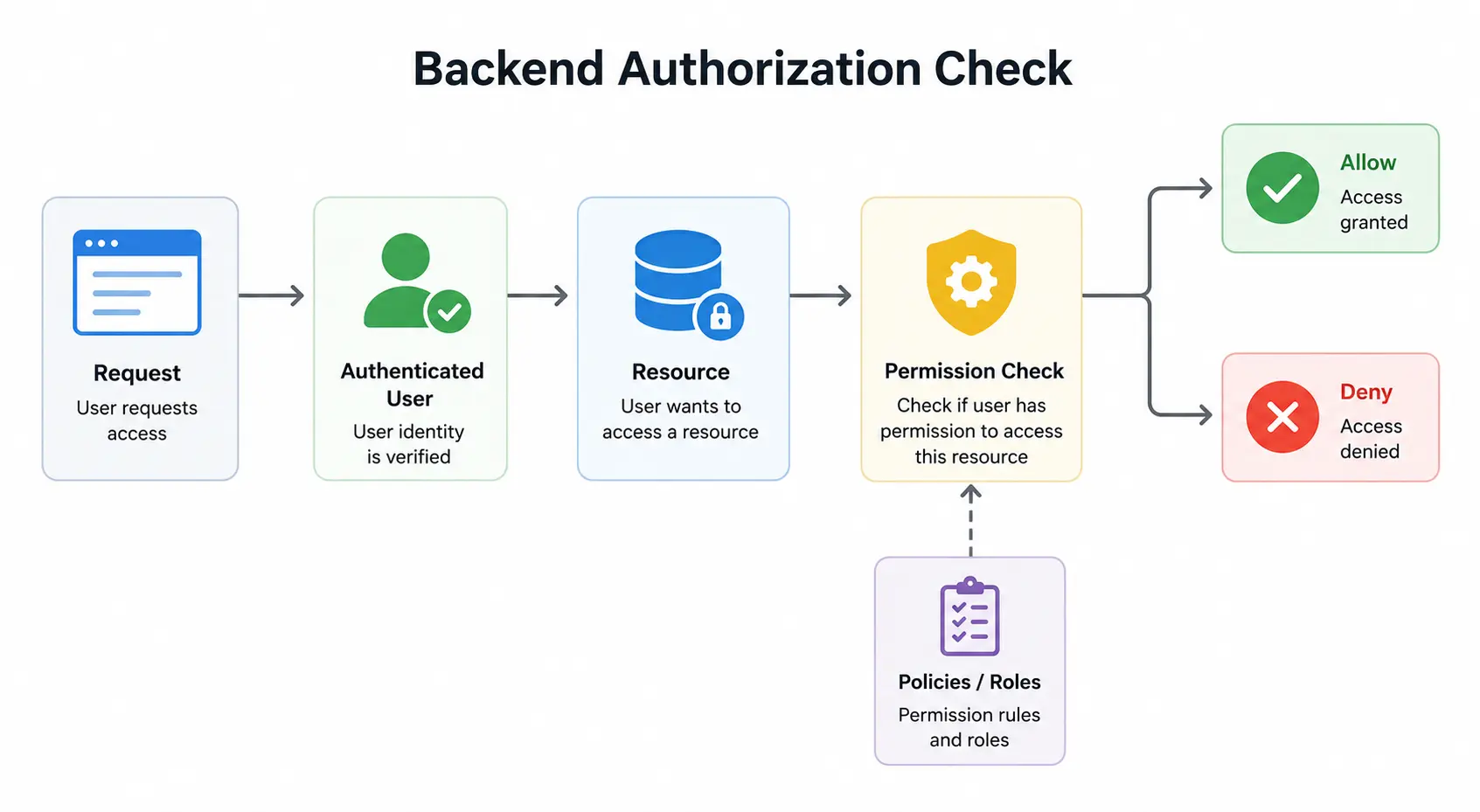
Authorization should happen on the backend, not only in the frontend.
Frontend checks are useful for user experience. You can hide an "Edit" button from users who do not have permission. But hiding a button does not secure the endpoint. A user can still call your API manually if the backend does not enforce the permission check.
The backend must always ask:
1Is this user allowed to perform this action on this resource?That "on this resource" part is important. A user might be allowed to edit their own profile, but not someone else's profile. A writer might be allowed to edit their own draft, but not another writer's published article.
Authentication vs Authorization in a Real App
Let us use a blog admin dashboard as an example.
A user visits:
1/admin/posts/123/editThe app needs to answer several questions:
- Is the user logged in?
- Does this user exist?
- Is this user's session still valid?
- Does this user have permission to edit posts?
- Does this user have permission to edit this specific post?
Questions 1 to 3 are mostly authentication. Questions 4 and 5 are authorization.
Here is what a simple backend flow might look like:
1async function editPost(request: Request) {
2  const user = await getAuthenticatedUser(request);
3
4  if (!user) {
5    return Response.json({ error: "Not authenticated" }, { status: 401 });
6  }
7
8  const post = await getPostById(request.params.postId);
9
10  if (!post) {
11    return Response.json({ error: "Post not found" }, { status: 404 });
12  }
13
14  const canEdit =
15    user.role === "admin" ||
16    post.authorId === user.id;
17
18  if (!canEdit) {
19    return Response.json({ error: "Not authorized" }, { status: 403 });
20  }
21
22  return updatePost(post.id, request.body);
23}
Notice the difference between 401 and 403:
- 401 Unauthorized usually means the user is not authenticated.
- 403 Forbidden means the user is authenticated but not allowed to perform the action.
The names are slightly confusing, but this is the practical convention most web developers follow.
Real-Life Scenario: A Blog Platform With Paid Members
Imagine you are building a blogging platform with public posts, private drafts, paid tutorials, and an admin dashboard.
The app has four users:
| User | Role | What they should be allowed to do |
|---|---|---|
| Visitor | Not logged in | Read public posts |
| Member | Logged in user | Read public posts and paid tutorials |
| Writer | Content creator | Create drafts and edit their own posts |
| Admin | Site owner | Manage users, posts, payments, and settings |
Now look at how authentication and authorization work together.
When a member logs in, authentication confirms the account belongs to that person. But authorization still needs to check whether the member has an active subscription before showing paid tutorials.
When a writer opens /dashboard/posts/123/edit, authentication confirms the writer is logged in. Authorization checks whether post 123 belongs to that writer or whether the writer has a higher permission.
When an admin opens /admin/users, authentication confirms the admin's identity. Authorization checks whether the account has the users:manage permission.
This is where many beginner apps break. They check only whether someone is logged in:
1if (!user) {
2  throw new Error("Please login");
3}
That is not enough. A better check asks what the user is trying to do:
1if (!user.permissions.includes("posts:update")) {
2  throw new Error("You do not have permission to update posts");
3}
4
5if (post.authorId !== user.id && !user.permissions.includes("posts:update_any")) {
6  throw new Error("You can only update your own posts");
7}
The unique lesson is this: authorization is not just about roles. It is about the relationship between the user, the action, and the resource.
1Can this user perform this action on this specific resource right now?That question catches problems that a simple isLoggedIn check will miss.
Sessions Explained
A session is a server-side way to remember that a user is logged in.
Here is the common flow:
- User submits login credentials.
- Server verifies the credentials.
- Server creates a session record.
- Server sends a session ID to the browser in a cookie.
- Browser automatically sends the cookie on future requests.
- Server looks up the session ID and identifies the user.
The cookie usually does not contain the whole user object. It contains a random session ID. The actual session data lives on the server, often in a database or Redis.
Sessions are a strong default for many web apps because they are easy to control. If the user logs out, you delete the session. If an account is compromised, you can revoke all sessions. If an admin changes permissions, the next request can use the updated server-side state.
Sessions work especially well for:
- Traditional server-rendered apps
- Admin dashboards
- SaaS apps
- Ecommerce apps
- Apps where logout and revocation must be immediate
The trade-off is that the server needs shared session storage if you run multiple backend instances. Redis is commonly used for this because it is fast and supports expiration. If you want to understand Redis in a backend stack, read PostgreSQL vs MongoDB vs Redis.
JWT Explained
JWT stands for JSON Web Token. A JWT is a signed token that can carry information, often called claims.
A simple JWT payload might contain:
1{
2  "sub": "user_123",
3  "role": "admin",
4  "iat": 1718370000,
5  "exp": 1718373600
6}
The server signs the token so it can later verify that the token has not been changed. This makes JWTs useful for stateless authentication because the API can verify the token without looking it up in a session database every time.
That sounds convenient, but JWTs have trade-offs.
JWT advantages:
- Good for APIs and distributed systems
- Can reduce session database lookups
- Useful when multiple services need to verify identity
- Works well with short-lived access tokens
JWT disadvantages:
- Harder to revoke before expiration
- Easy to misuse with long expiration times
- Dangerous if stored carelessly
- Permission changes may not apply until the token expires
A common production pattern is:
- Short-lived access token
- Longer-lived refresh token
- Refresh token stored securely
- Token rotation
- Server-side revocation for refresh tokens
For many beginner apps, JWTs are overused. They are useful, but they are not automatically better than sessions. If your app is a normal website with a backend, a database, and browser users, sessions are often simpler and safer.
Cookies, localStorage, and Token Storage
Where you store auth data matters.
Browser apps commonly use:
- Cookies
- localStorage
- sessionStorage
- in-memory state
For sensitive authentication data, HttpOnly cookies are usually safer than localStorage. An HttpOnly cookie cannot be read by JavaScript, which reduces the damage from cross-site scripting attacks.
Recommended cookie settings for auth:
1HttpOnly
2Secure
3SameSite=Lax or SameSite=Strict
Use Secure so the cookie is only sent over HTTPS. Use HttpOnly so JavaScript cannot read it. Use SameSite to reduce cross-site request forgery risk.
localStorage is easy to use, but it is readable by JavaScript. If an attacker manages to run JavaScript on your page, tokens in localStorage are exposed.
This does not mean cookies solve everything. Cookie-based auth still needs CSRF protection, correct SameSite settings, and careful API design. But for browser-based web apps, HttpOnly cookies are usually the better default.
OAuth Explained Without the Confusion
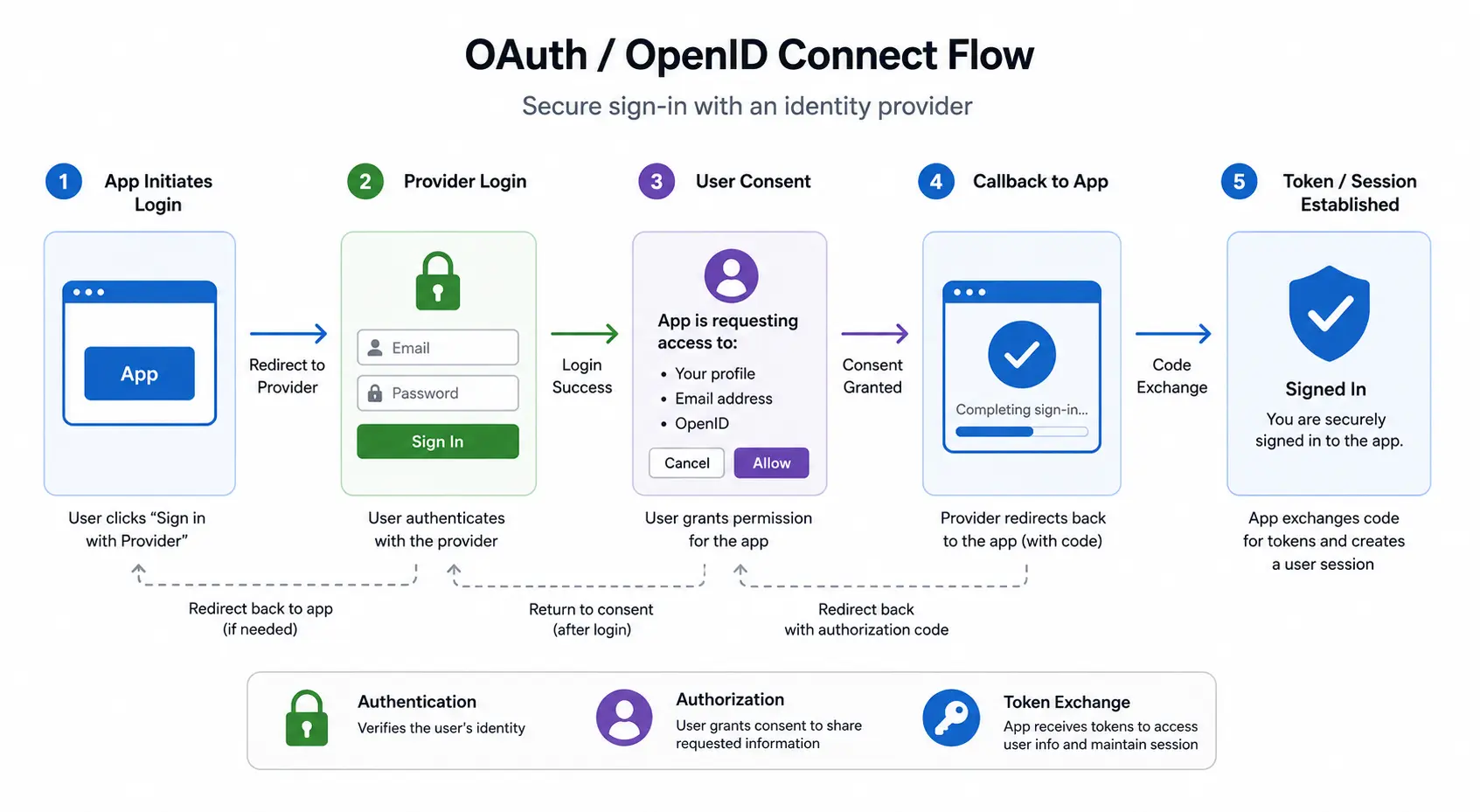
OAuth is often described as "login with Google," but that is not the full story.
OAuth is mainly an authorization framework. It lets one application access resources from another service on behalf of a user, without giving the first application the user's password.
Example:
You build a project management app. A user wants to connect their GitHub account. Your app redirects the user to GitHub. GitHub asks the user for permission. If the user approves, GitHub gives your app a token with limited access.
That token might allow your app to:
- Read repository names
- Create issues
- Read user email
The exact access depends on the scopes the user approved.
For login, modern apps usually use OpenID Connect, also called OIDC. OIDC is built on OAuth and adds identity information. So when people say "OAuth login," they often mean OAuth plus OpenID Connect.
Use OAuth or OIDC when:
- Users sign in with Google, GitHub, Microsoft, or another provider
- Your app needs to access another service's API
- You want delegated authorization
- You do not want to manage passwords yourself
Do not invent your own OAuth flow. Use a trusted library or provider unless you have a very strong reason not to.
RBAC: Role-Based Access Control
RBAC means Role-Based Access Control. Instead of assigning permissions directly to every user, you assign users to roles.
Example roles:
- User
- Editor
- Moderator
- Admin
Each role has permissions.
| Role | Example permissions |
|---|---|
| User | Read posts, update own profile |
| Editor | Create posts, edit own posts |
| Moderator | Review comments, hide comments |
| Admin | Manage users, delete posts, change settings |
RBAC is simple and works well for many apps. A blog platform, SaaS dashboard, internal tool, or ecommerce admin panel can often start with RBAC.
The mistake is making roles too broad too early. If every serious permission becomes "admin," your app becomes risky. A support team member might need to refund orders, but not delete users. A writer might need to publish posts, but not change billing settings.
A better approach is to combine roles with permissions:
1role: "editor"
2permissions:
3  - "posts:create"
4  - "posts:update_own"
5  - "posts:publish"
This gives you more flexibility while keeping the system understandable.
Permissions Should Be Checked Close to the Action
Authorization checks should live near the action they protect.
For example, do not only check permissions when rendering a page. Also check permissions when the user submits the form or calls the API.
Weak approach:
1Hide delete button if user is not admin.Better approach:
1Hide delete button in the UI.
2Also reject DELETE /api/users/:id unless the user has permission.
This matters because users can call APIs directly. Browser developer tools, API clients, scripts, and modified frontend code can all bypass UI-only checks.
Every sensitive backend route should verify:
- The user is authenticated.
- The user has the required permission.
- The target resource belongs to the correct tenant, organization, or owner.
- The action is allowed in the current state.
For example, in a multi-tenant SaaS app, checking user.role === "admin" is not enough. You also need to check whether the user is an admin of the correct organization.
Common Authentication and Authorization Mistakes
Auth bugs are painful because they often look small in code but serious in production. These are the mistakes to avoid.
1. Confusing Login with Permission
A logged-in user is not automatically allowed to do everything.
Always separate:
- Identity check
- Permission check
- Resource ownership check
2. Trusting Frontend Checks
Frontend checks improve the interface. Backend checks protect the system.
Never rely only on hidden buttons, disabled inputs, or protected frontend routes.
3. Storing Plain Text Passwords
Plain text passwords should never be stored. Store password hashes using a password hashing algorithm designed for passwords.
4. Using Long-Lived JWTs
A JWT that lives for weeks or months is difficult to revoke. Use short-lived access tokens and a safer refresh-token strategy.
5. Putting Sensitive Data Inside JWTs
JWTs are usually signed, not encrypted. Anyone who has the token can often decode and read the payload.
Do not put secrets, passwords, private profile data, or sensitive billing details inside a JWT payload.
6. Forgetting Rate Limits on Auth Routes
Login, signup, password reset, and OTP routes should be rate limited. These endpoints are common targets for brute-force attacks and abuse.
This is where API Rate Limiting Explained becomes directly useful.
7. Missing Tenant Checks
In SaaS apps, users often belong to organizations or workspaces. A user might be an admin in one workspace and a normal member in another.
Always check the organization or tenant boundary before allowing access.
A Practical Auth Stack for a Web App
For a normal web app, this is a strong starting point:
| Requirement | Practical choice |
|---|---|
| User accounts | PostgreSQL |
| Password storage | Argon2, bcrypt, or scrypt hashes |
| Session storage | Database or Redis |
| Browser auth | HttpOnly Secure cookies |
| API protection | Server-side session or short-lived JWT |
| Permissions | RBAC plus resource ownership checks |
| Social login | OAuth/OIDC provider |
| Abuse prevention | Rate limiting on auth endpoints |
| Admin actions | Extra permission checks and audit logs |
This stack is boring in a good way. It is understandable, debuggable, and suitable for most real-world projects.
If your system grows into multiple services, mobile apps, third-party API consumers, or enterprise SSO, then you can add more advanced patterns. But do not start with complexity just because auth has fancy terminology.
Best Practices Checklist
Use this checklist when building authentication and authorization:
- Hash passwords; never store plain text passwords.
- Use HttpOnly, Secure cookies for browser sessions when possible.
- Keep session and token expiration times reasonable.
- Rate limit login, signup, password reset, and OTP endpoints.
- Check permissions on the backend, not only in the UI.
- Use
401when the user is not authenticated. - Use
403when the user is authenticated but not allowed. - Keep JWT access tokens short-lived.
- Do not store sensitive data inside JWT payloads.
- Re-check resource ownership on every sensitive action.
- Log important admin and security-related actions.
- Use trusted libraries for OAuth and OpenID Connect.
Further Reading
- OWASP Authentication Cheat Sheet
- OWASP Authorization Cheat Sheet
- MDN: Using HTTP cookies
- OAuth 2.0
- OpenID Connect: How Connect Works
Final Recommendation
If you are building your first serious web app, do not overcomplicate authentication.
Start with:
- Email/password or a trusted OAuth provider
- Server-side sessions
- HttpOnly Secure cookies
- Role-based access control
- Backend permission checks
- Rate limits on auth endpoints
Then add JWTs, refresh tokens, SSO, passkeys, or advanced permission models only when your app actually needs them.
Authentication gets the user into the system. Authorization keeps the system safe after they are inside. A good backend needs both.
FAQs
What is the difference between authentication and authorization?
Authentication verifies who a user is. Authorization decides what that verified user can access or change. Login is authentication. Checking whether the logged-in user can open an admin dashboard is authorization.
Should I use sessions or JWT for authentication?
Use sessions for most traditional web apps because they are easier to revoke and control. Use JWTs when you have stateless APIs, distributed services, or mobile/API clients that benefit from signed tokens.
Is OAuth the same as login?
Not exactly. OAuth is mainly about delegated authorization. For login, apps usually use OpenID Connect, which builds on OAuth and adds identity information.
Is localStorage safe for JWTs?
localStorage is convenient but risky for sensitive tokens because JavaScript can read it. If an attacker runs JavaScript on your page, they may be able to steal tokens from localStorage. HttpOnly cookies are usually safer for browser-based apps.
What is RBAC?
RBAC stands for Role-Based Access Control. It assigns users to roles such as user, editor, moderator, or admin. Each role has permissions that decide what users can do.
Should authorization checks happen in the frontend or backend?
Authorization checks must happen in the backend. Frontend checks are useful for hiding buttons or improving the interface, but they do not secure your API.
GitHub Discussions
Discuss this article