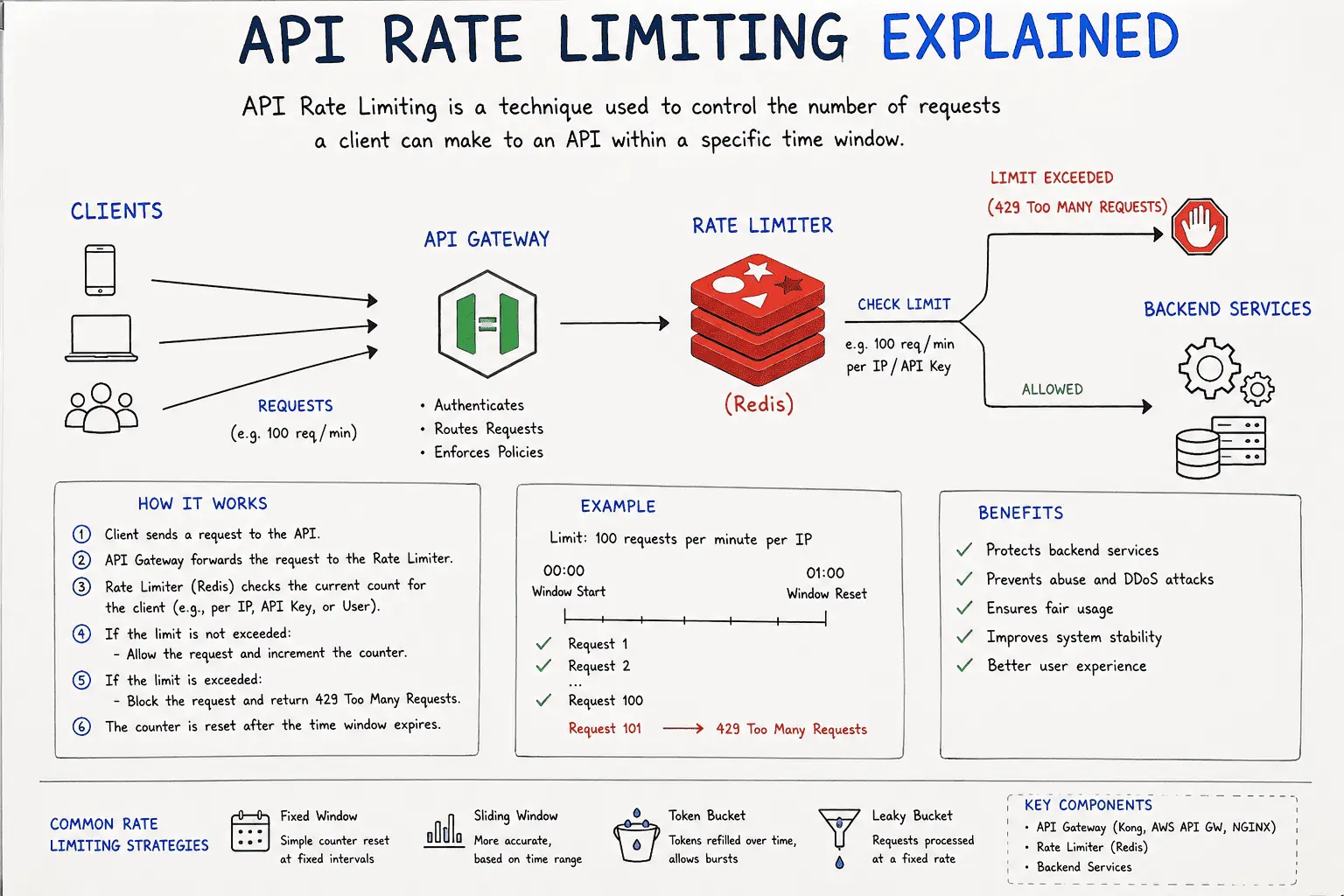
API Rate Limiting Explained: Protecting Your Backend with Redis, Tokens & Sliding Windows
Executive Summary
API rate limiting is a cornerstone of robust API management. By capping the number of requests a client can make in a given time frame, rate limiting prevents malicious abuse like DDoS-style traffic spikes and keeps service predictable for real users. Without limits, backend resources such as servers, databases, queues, and networks can overload quickly.
If you are still building your API fundamentals, read Types of APIs Explained for Web Developers first. If your API becomes slow because of database behavior, pair this guide with Advanced Database Optimization and the PostgreSQL vs MongoDB vs Redis guide.
This article explains why rate limiting is needed, where to apply it, and how common algorithms work. We compare fixed windows, sliding windows, token buckets, leaky buckets, and hybrid approaches, then build Redis-based Node.js/Express implementations with atomic Lua scripts, TTLs, and production-ready HTTP headers.
Why Rate Limiting Is Needed
APIs without rate limits are vulnerable. The OWASP API Security Top 10 warns that unrestricted resource consumption can lead to Denial of Service (DoS), resource exhaustion, and cost spikes. In practice, large traffic spikes, whether malicious or accidental, can overwhelm a service and make it unavailable to other clients. Rate limiting guards against abuse (brute force, credential stuffing, API scraping), enforces fair use, and keeps infrastructure costs under control. It also enforces fairness: by capping each client, no single user or tenant can "hog" resources and degrade everyone else's experience. The benefits include improved API stability, consistent performance, and predictable capacity planning. In summary, rate limiting maintains security, stability, and fairness by shaping traffic before it can overwhelm backend systems.
Where to Apply Rate Limits (Network to Database Layers)
Rate limiting can be applied at multiple levels of the stack:
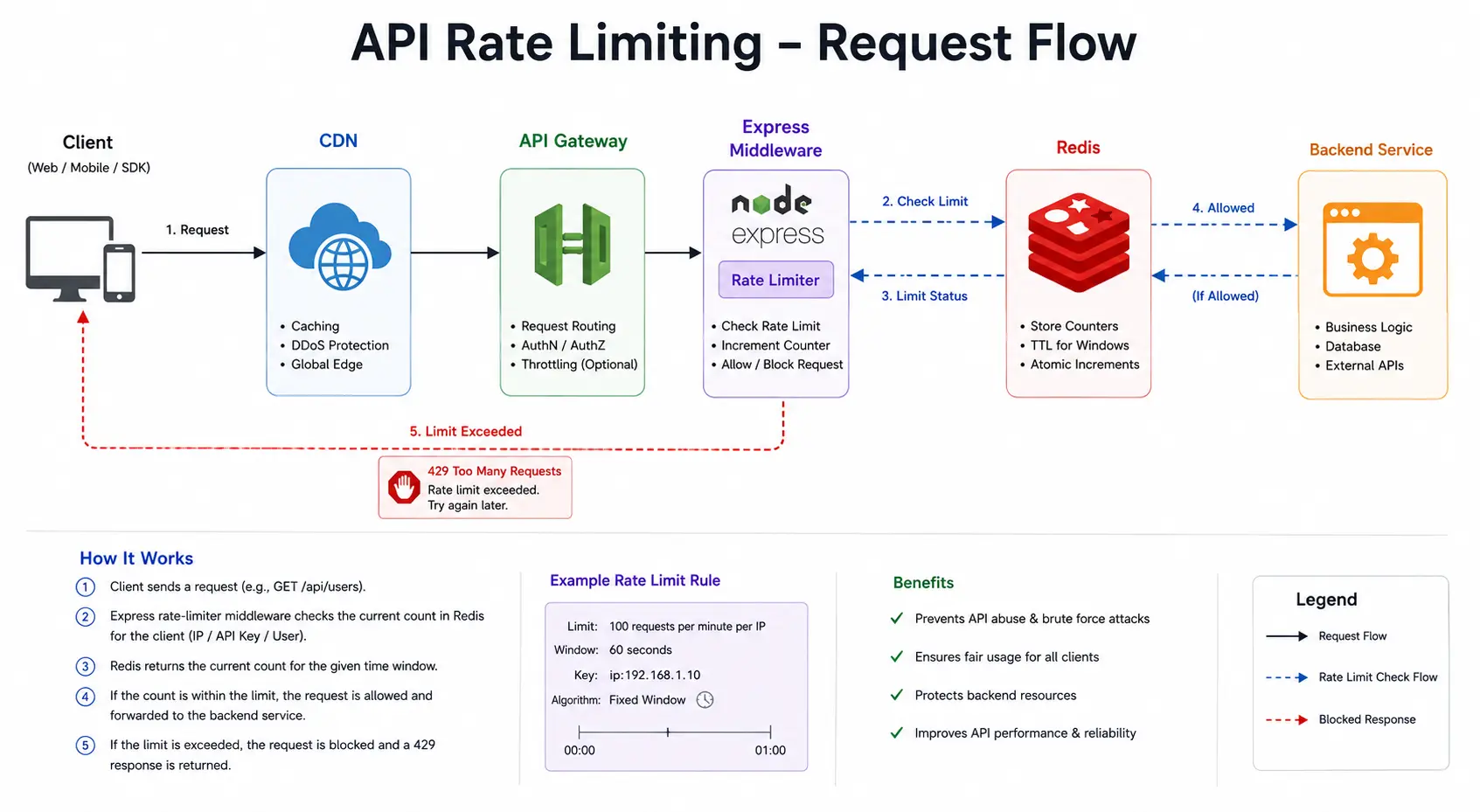
- Network/Edge (Layer 4): Firewalls, load balancers, or DDoS protection (e.g. AWS Shield, Cloudflare) can throttle or drop excess connections early. These act at the TCP/UDP level (e.g. limiting new connections or bandwidth per IP). CDNs or WAFs often support simple rate-based rules to block floods.
- API Gateway / Ingress: Most API gateways (AWS API Gateway, Kong, NGINX, Apigee, etc.) have built-in throttling. For example, AWS API Gateway uses a token bucket algorithm with configurable rate and burst limits; when exceeded, it returns HTTP 429. Kong's rate-limiting plugin can use Redis in "cluster" mode for shared counters across nodes. Service meshes (Envoy/Istio) often call an external rate-limit service per request. These gateway-level controls are ideal for enforcing global or per-consumer quotas (clients identified by API key, JWT, or IP).
- Application Code (Layer 7): Embedding limits in the app with Express middleware gives fine-grained control. As shown in the Node.js examples below, the app can maintain Redis counters, sorted sets, or token buckets keyed by client ID. This approach is practical and flexible, but requires careful atomicity.
- Database: In some cases, expensive database operations are protected by database-side throttling (e.g. PostgreSQL resource governor, or DynamoDB provisioned throughput). These effectively rate-limit queries or writes. However, true API request rate limiting is usually better handled upstream to avoid wasted DB hits.
In practice, these layers often complement each other. For instance, an AWS Application Load Balancer or CloudFront might do coarse IP-based limiting, while an API gateway enforces per-API-key limits, and the app code polices specific high-cost operations. According to Amazon's multi-tenant design, "Rate limiting lets us shape incoming traffic ... so that one tenant's unplanned spike is rejected while others continue with predictable performance." Similarly, the Gravitee API blog notes that rate limiting can be applied on web servers, API gateways, and within application code to protect downstream services.
Key Algorithms and Their Trade-offs
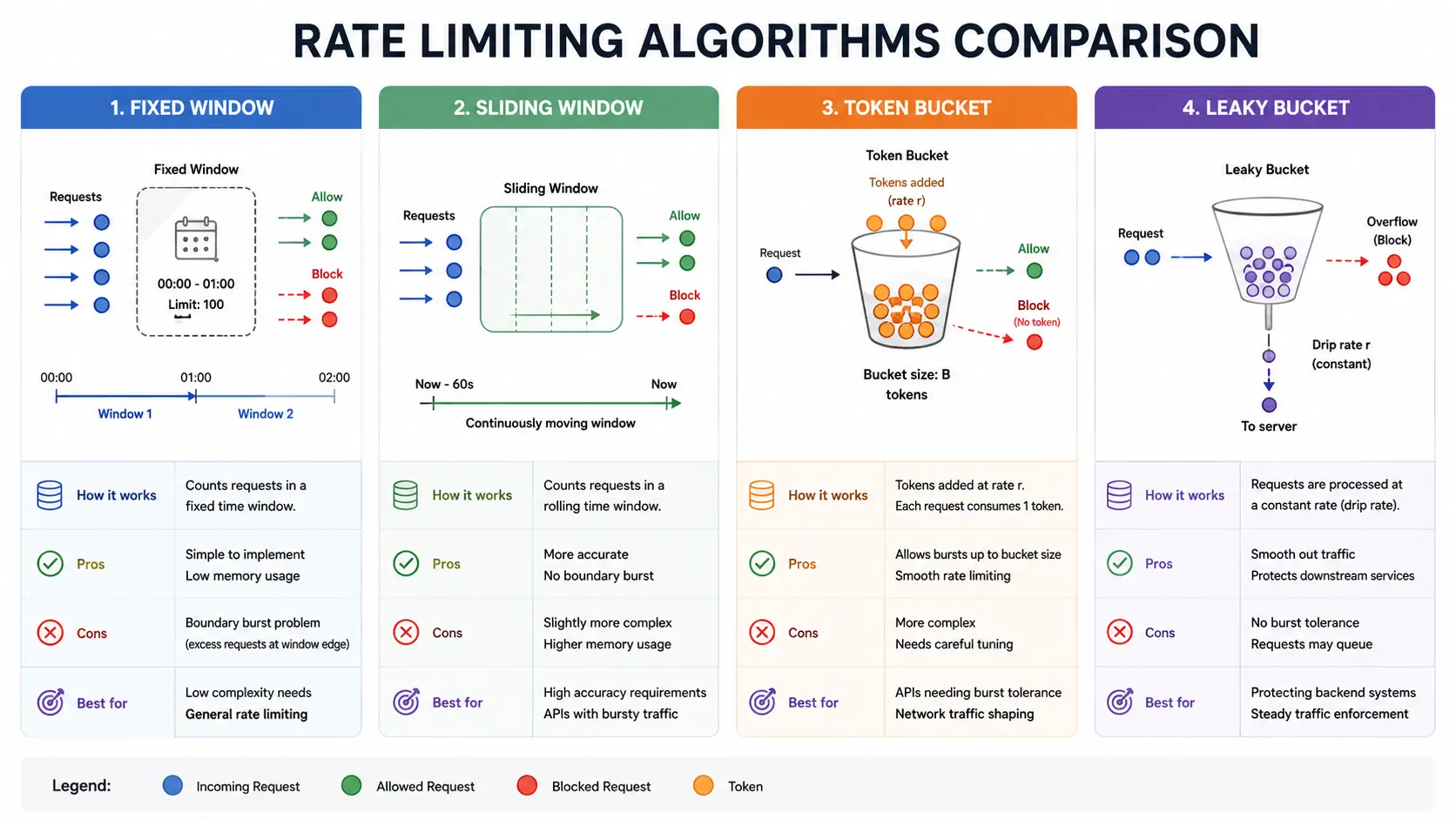
API rate limiting is typically implemented by counting requests in a time window. The most common algorithms are: fixed window, sliding window (log and counter), token bucket, and leaky bucket. Each has its own trade-offs:
1. Fixed Window Counter
Time is divided into equal fixed intervals, such as one minute. A simple counter tracks requests in the current window. On each request, Redis increments a key with INCR; when the window ends, the key expires and the counter resets.
Pros: Minimal memory, very fast, and easy to understand.
Cons: It can allow "boundary bursts." A client can send N requests at the end of one window and another N at the start of the next, effectively doubling the intended rate for a short period.
Best for: Basic quotas, login attempt throttling, and low-risk endpoints where occasional bursts are acceptable.
2. Sliding Window Log
This keeps a timestamped log of every request in a Redis sorted set. On each request, Redis removes entries older than the active window, counts the remaining entries, and decides whether to allow the request.
Pros: Very accurate. It strictly enforces exactly N requests in the trailing window.
Cons: Memory grows with request volume because each request stores a timestamp. It is also slower than a simple counter because it uses sorted-set operations like ZADD, ZREMRANGEBYSCORE, and ZCARD.
Best for: Payment APIs, authentication endpoints, audit-sensitive APIs, and places where exact enforcement matters more than raw speed.
3. Sliding Window Counter
This is a lighter approximation of the sliding window log. It keeps two counters: one for the current window and one for the previous window. A script calculates a weighted total based on how far the current window has progressed.
Pros: Much lower memory than a full sliding log, with smoother behavior than a fixed window.
Cons: It is still an approximation. In rare cases, it may allow or deny a request differently from an exact sliding log.
Best for: General distributed API rate limiting, especially when traffic is high and Redis memory needs to stay predictable.
4. Token Bucket
Imagine a bucket that fills with "tokens" at a steady rate. Each request consumes one token. If the bucket has tokens, the request is allowed. If the bucket is empty, the request is denied until more tokens refill.
Pros: Handles controlled bursts well while still enforcing a long-term average rate.
Cons: Slightly more complex to implement because you need to calculate elapsed time, refill tokens, cap the bucket, and consume tokens atomically.
Best for: APIs where short bursts are normal, such as mobile apps syncing data, messaging systems, or dashboards that load several resources at once.
5. Leaky Bucket
The leaky bucket drains at a fixed rate. In policing mode, excess requests are dropped immediately. In shaping mode, excess requests are queued and released gradually. In Redis, this usually uses a hash with fields like level, last_leak, or next_free.
Pros: Produces very smooth traffic and protects downstream services from sudden spikes.
Cons: Policing can feel strict because it drops requests immediately. Shaping can add latency because requests may wait in a queue.
Best for: Strict throughput limits, background jobs, async processing, and services that need steady traffic more than burst tolerance.
Hybrid Approaches: Often, multiple algorithms are layered. For example, one might use a token bucket per user and a fixed-window global limit. Redis tutorial suggests combining a token bucket for per-user limits and a fixed window for global limits. In general, sliding-window counter is a safe default for distributed systems, while fixed windows can complement for very coarse quotas, and exact logs reserved for critical paths.
Algorithm Comparison: A quick summary of these algorithms is shown in Table 1. Note how they differ in memory use, accuracy, burstiness and typical use-cases. (The analysis is based on the Redis official comparison.)
| Algorithm | Memory/Complexity | Accuracy | Burst Handling | Recommended Use-Case |
|---|---|---|---|---|
| Fixed Window Counter | O(1) memory (one key) | Lower (spikes possible) | High (boundary spikes) | Simple quotas (login throttle, basic APIs) |
| Sliding Window Log | O(N) memory (timestamps) | Exact (no bursts) | None (smoothed) | Precise quotas, audit/logging, payments |
| Sliding Window Counter | O(1) memory (2 keys) | High (approximation) | Limited (smoothed by weight) | General distributed APIs (default choice) |
| Token Bucket | O(1) memory (hash fields) | High (avg rate) | High (controlled bursts) | Bursty traffic with average rate needs |
| Leaky Bucket (Policing) | O(1) memory (hash) | High | None (strict drop) | Strict throughput limits, no bursts allowed |
| Leaky Bucket (Shaping) | O(1) memory (hash) | High | None (with queueing) | Buffered/async workloads where delay is OK |
Table 1: Comparison of common rate-limiting algorithms (memory, accuracy, burst behavior, use cases).
Redis-Based Implementations: Data Structures & Scripting
Redis is ideal for implementing rate limiters due to its speed, rich data types, atomic operations, and easy TTL support. For token buckets and sliding windows, common Redis patterns include:
-
Data Structures:
- Fixed/Sliding Counter: A Redis string per window or per window segment, incremented with
INCR. - Sliding Log: A sorted set where each member's score and value is the request timestamp.
- Token Bucket: A hash storing fields like
tokens(current token count) andlast_refill. - Leaky Bucket: A hash with fields like
levelandlast_leak(for policing) ornext_free(for shaping).
- Fixed/Sliding Counter: A Redis string per window or per window segment, incremented with
-
Commands & Atomicity: Key to correctness is atomic read-modify-write. Lua scripting is used so that each request's logic (prune old entries, compute allowance, increment counter or consume token) executes in a single
EVALcall. For example, a token-bucket Lua script willHGETALLthe hash, compute elapsed time refill, decrement a token, andHSET/EXPIRE-- all without interruption. Without Lua, one would need complexWATCH/MULTItransactions that can fail under concurrency. Redis scripts guarantee atomicity and reduce latency by eliminating multiple round-trips. -
Expiry (TTL): All implementations typically set an expiry so idle clients' keys auto-cleanup. E.g. in a token bucket we set
EXPIRE key (max_tokens/refill_rate + 1)so that once a bucket fully refills, its key expires. For sliding windows, one often expires the sorted set after one window length; but since we also trim old entries, the key expiry is often just the window size. In sliding counter, we set TTL = window * 2 so the "previous" counter survives one extra window for weighted calc. These expirations bound memory usage for inactive clients. -
Redis Cluster (Sharding): In a clustered Redis setup, multi-key scripts must target the same hash slot. For sliding counters (two keys), we use Redis key tags: e.g. keys
{user123}:window1and{user123}:window2share slot. The Redis tutorial explicitly notes using{base}:windowNumso both string keys land on one node. Without this, a Lua script touching two keys would fail in cluster mode. Note that token bucket or sliding log approaches typically use a single key per client, so they are cluster-safe by design. -
Persistence: Rate limiter state is usually short-lived, so Redis persistence is optional. If enabled, periodic RDB/AOF snapshots can preserve counters through restarts, but this is not critical for ephemeral limits (clients soon expire and reset). However, Redis persistence can help prevent lost state in case of failures. In cluster mode, data is sharded across nodes (with replication); ensure your key namespace balances across the cluster.
-
Race Conditions: Without atomic scripts, two concurrent requests could both pass checks and both increment, breaching limits. All approaches use Lua to avoid this. Redis atomic
INCRhelps for simple fixed windows, while Lua scripts are safer when a limiter needs multiple Redis reads and writes in one decision. -
Memory and Performance Considerations:
- Memory: As above, sliding log can use O(N) entries per client per window, so it's suitable only when N is moderate. Token bucket and counters use constant space. If you expect millions of clients, ensure your Redis (or Redis cluster) has enough RAM.
- Throughput: Redis can handle tens of thousands of ops/sec per instance; using pipelining or Lua further boosts performance by reducing RTTs. Even so, extremely high-throughput scenarios may require sharding clients by key or deploying multiple rate-limiting proxies.
- Latency: Each limit check adds a small Redis round-trip (or one script execution). In practice this is sub-millisecond. The latency-vs-throughput trade-off chart below (Figure 1) illustrates that as request rate approaches Redis's capacity, queuing delays may grow. (In many cases, the limiter is off-path or uses asynchronous handling so slight latency is tolerable.)
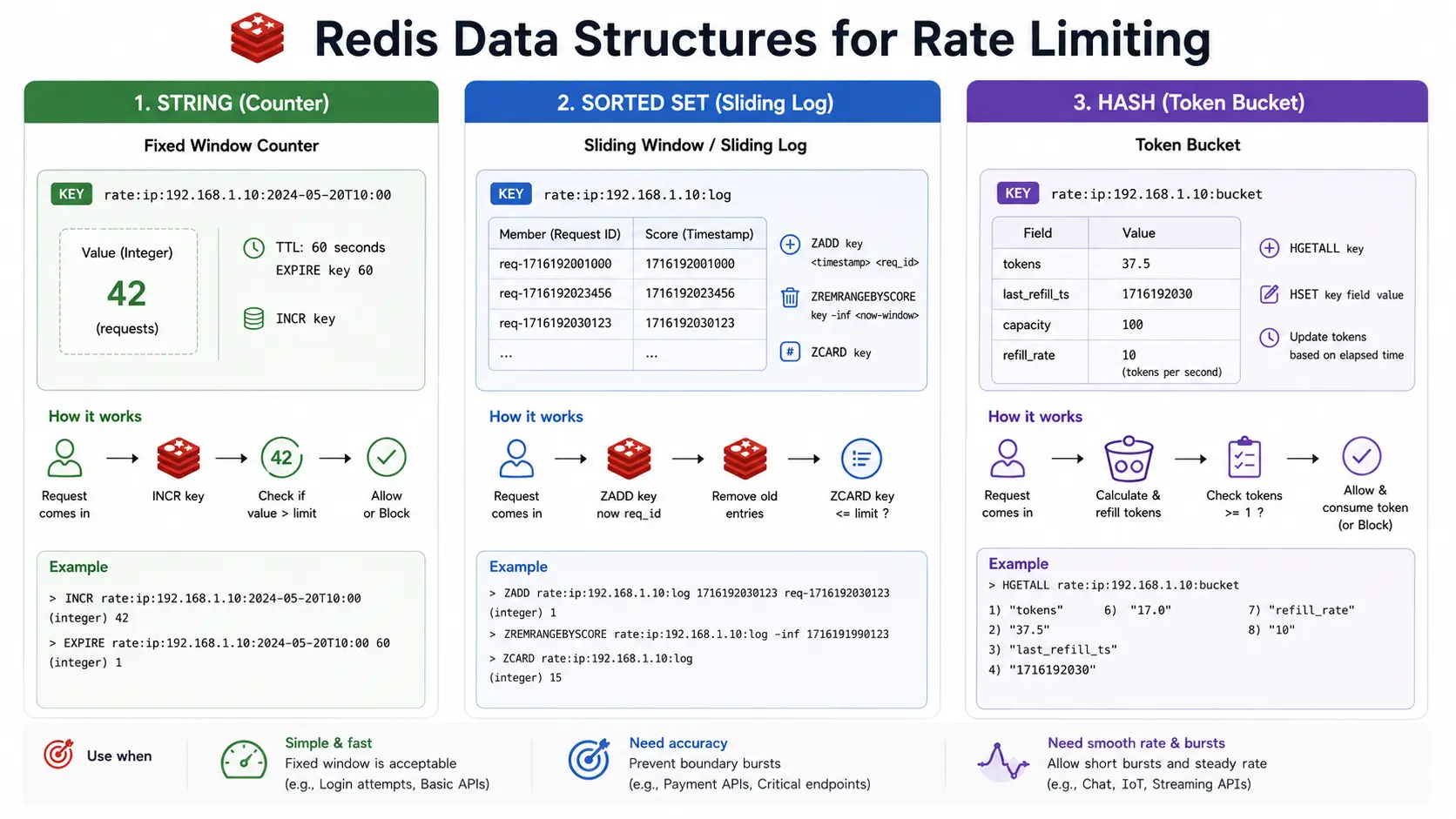
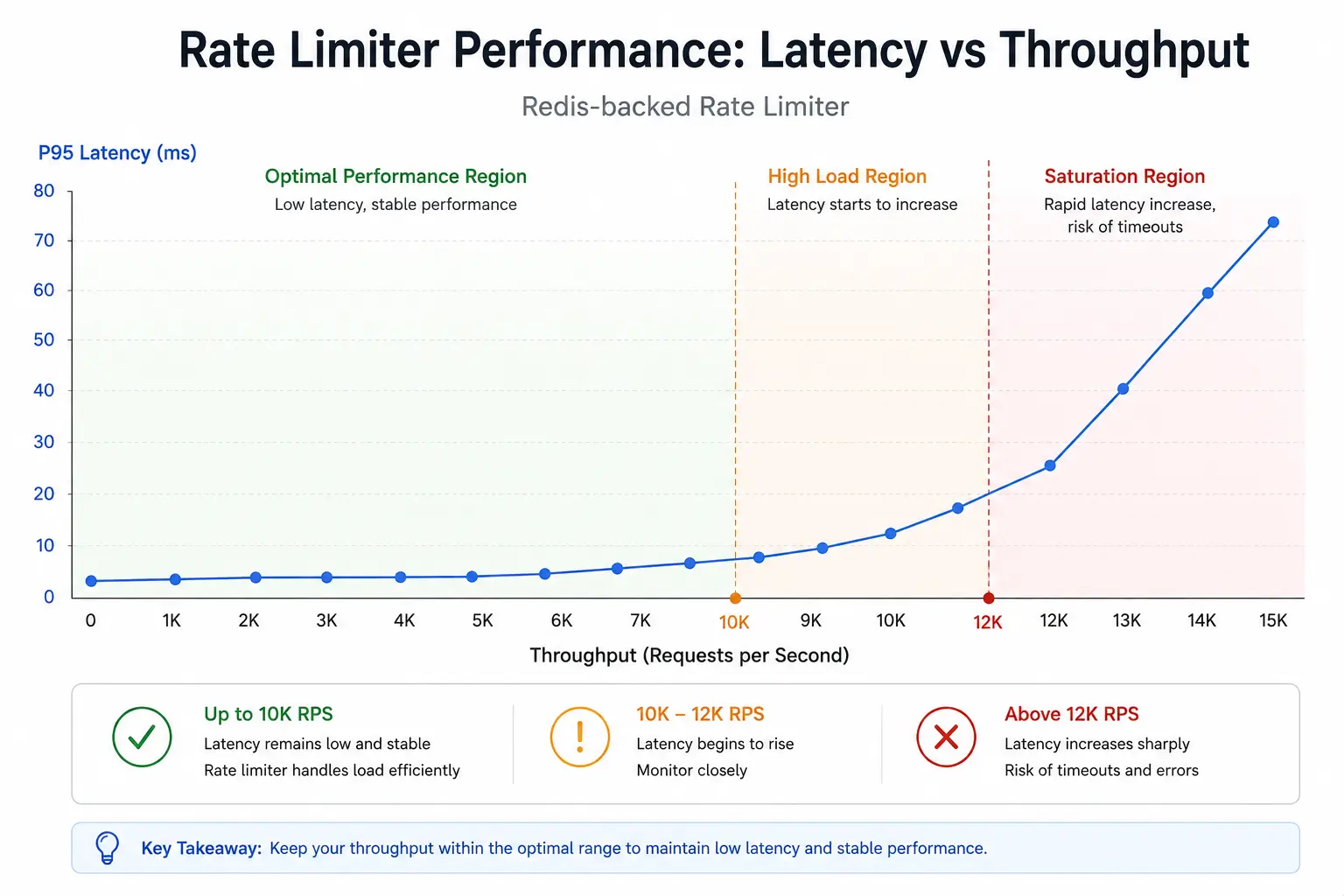
Figure 1: Conceptual chart of request throughput vs observed latency under a rate limiter. As incoming rate grows, latency stays low until Redis or service saturates; near peak, latency rises due to queuing.
Client Identification & Multi-Tenancy
A central design choice is how to identify the client for rate limits. Common identifiers include the API consumer's user ID, account/tenant ID, API key, or IP address. For authenticated APIs, use the user or account ID so that all clients behind NAT count separately. For public or unknown clients, fall back to IP (but beware multiple clients behind a proxy). Some systems even apply multi-dimensional limits: e.g. both per-user and per-IP quotas. In practice, a Redis key might be rate:{tenant_id}:{user_id} or rate:{api_key}. Make sure the key uniquely represents the quota owner.
In multi-tenant environments, fairness and isolation are critical. You should assign each tenant its own "pool" of capacity. For example, AWS services use per-account quotas. If one tenant suddenly spikes, only that tenant's excess requests are throttled, and others continue unaffected. This prevents the "noisy neighbor" problem. In Redis implementation, simply prefix keys by tenant or account. You might enforce a tenant-level rate (overall limit) and a per-user limit within that tenant. Gravitee suggests layers of tenant-level, user-level, and endpoint-level limits for full isolation.
For distributed rate limiting (multiple app instances), using Redis as a shared store ensures all instances see the same counters. Kong and other gateways use a Redis policy for this reason. Just be mindful of Redis failover: use a managed service or HA cluster to avoid a single point of failure.
HTTP Status Codes & Response Headers
When a request exceeds the limit, the API should respond 429 Too Many Requests. As AWS documentation notes, returning 429 (instead of a 500-level error) signals to clients that they hit the limit. The response should include:
- Retry-After: An HTTP
Retry-Afterheader (in seconds or as a timestamp) tells the client how long to wait before retrying. In our Node example (below) we setRetry-Afterto the key's TTL. Well-behaved clients can respect this header. - Rate Limit Headers: Many APIs still return de facto headers like
X-RateLimit-Limit,X-RateLimit-Remaining, andX-RateLimit-Resetto indicate quota status. The current IETF HTTPAPI draft usesRateLimit-Policyfor the advertised quota policy andRateLimitfor the quota currently available under that policy. Using these headers, or your API's documented custom variants, lets clients monitor their usage. For example:
HTTP/1.1 429 Too Many Requests
Retry-After: 30
RateLimit-Policy: "per-minute";q=100;w=60
RateLimit: "per-minute";r=0;t=30
In short, map limiter outcomes to standard HTTP: allow (2xx success), deny (429) with helpful headers.
Monitoring, Metrics & Observability
Effective rate limiting needs visibility. Track metrics such as current request rate, allowed vs blocked counts, and key TTLs/expirations. For instance, AWS recommends services "expose information to clients about their quota and usage". Many systems emit metrics (via CloudWatch, Prometheus, etc.) on throughput and throttles. For Redis-based limiters, monitor Redis itself (keyspace size, memory usage, latency) and application metrics (429 count, average refill times). Logging each 429 (with client ID) helps diagnose misconfigured limits.
Testing is crucial: simulate normal and spiky traffic to verify limits. Use load tests to ensure the limiter enforces correctly and doesn't become a bottleneck. Also, have dashboards alert when many clients approach their quota. (AWS, for example, exposes metrics so clients can alarm on nearing limits.) In production, regularly review usage patterns and adjust limits or capacity.
Example Implementation: Node.js (Express) + Redis
Below is a basic Express middleware using Redis (via ioredis) for a fixed-window rate limiter. It limits each client (by IP) to 100 requests per minute. The script shows how to atomically increment a Redis counter, set its TTL, and return 429 with Retry-After when exceeded.
1const Redis = require('ioredis');
2const redis = new Redis(); // Connects to Redis
3
4const WINDOW_SEC = 60;
5const MAX_REQUESTS = 100;
6
7const fixedWindowScript = `
8local key = KEYS[1]
9local limit = tonumber(ARGV[1])
10local window = tonumber(ARGV[2])
11
12local count = redis.call("INCR", key)
13if count == 1 then
14    redis.call("EXPIRE", key, window)
15end
16
17local ttl = redis.call("TTL", key)
18if count > limit then
19    return {0, count, ttl}
20end
21
22return {1, count, ttl}
23`;
24
25async function rateLimitMiddleware(req, res, next) {
26    const clientId = req.ip; // or use req.headers['x-api-key'], user ID, etc.
27    const key = `rate_limit:${clientId}`;
28
29    try {
30        const [allowed, count, ttl] = await redis.eval(
31            fixedWindowScript,
32            1,
33            key,
34            MAX_REQUESTS,
35            WINDOW_SEC
36        );
37
38        if (!allowed) {
39            res.setHeader('Retry-After', ttl);
40            res.setHeader('RateLimit-Limit', MAX_REQUESTS);
41            res.setHeader('RateLimit-Remaining', 0);
42            res.setHeader('RateLimit-Reset', ttl);
43
44            return res.status(429).json({
45                error: 'Too Many Requests',
46                message: `Rate limit exceeded. Try again in ${ttl}s.`
47            });
48        }
49
50        res.setHeader('RateLimit-Limit', MAX_REQUESTS);
51        res.setHeader('RateLimit-Remaining', Math.max(MAX_REQUESTS - count, 0));
52        res.setHeader('RateLimit-Reset', ttl);
53
54        next();
55    } catch (err) {
56        console.error('Rate limiting error:', err);
57        // On error, optionally fail-open or return 500:
58        res.status(500).json({ error: 'Internal error' });
59    }
60}
61
62// Usage in Express:
63const express = require('express');
64const app = express();
65app.use(rateLimitMiddleware);
66app.get('/', (req, res) => res.send('Hello, world!'));
67app.listen(3000);
Code 1: Express.js middleware implementing a simple fixed-window rate limiter with Redis.
This example uses the client's IP as the identifier (for production, a user ID or API key is usually safer). The Lua script increments the key, sets the expiry on the first request in the window, and returns the current count and TTL in one atomic operation. If the script denies the request, the middleware returns 429 with Retry-After and rate-limit headers.
Example Implementation: Node.js (Express) + Redis Sliding Window Log
The following Express example uses a sliding window log in Redis to allow 10 requests per minute. It stores timestamps in a sorted set, removes old entries, counts the current window, and returns 429 when the client exceeds the limit.
1const express = require('express');
2const Redis = require('ioredis');
3const crypto = require('crypto');
4
5const app = express();
6const redis = new Redis();
7
8const RATE_LIMIT = 10;
9const WINDOW_SEC = 60;
10
11async function slidingWindowLimiter(req, res, next) {
12    const clientId = req.ip; // Prefer user ID or API key for authenticated APIs.
13    const key = `rate_limit:sliding:${clientId}`;
14    const now = Date.now();
15    const windowStart = now - WINDOW_SEC * 1000;
16    const member = `${now}:${crypto.randomUUID()}`;
17
18    try {
19        const pipeline = redis.pipeline();
20        pipeline.zremrangebyscore(key, 0, windowStart);
21        pipeline.zadd(key, now, member);
22        pipeline.zcard(key);
23        pipeline.expire(key, WINDOW_SEC);
24
25        const results = await pipeline.exec();
26        const requestCount = results[2][1];
27
28        if (requestCount > RATE_LIMIT) {
29            await redis.zrem(key, member);
30
31            res.setHeader('Retry-After', WINDOW_SEC);
32            res.setHeader('RateLimit-Limit', RATE_LIMIT);
33            res.setHeader('RateLimit-Remaining', 0);
34            res.setHeader('RateLimit-Reset', WINDOW_SEC);
35
36            return res.status(429).json({
37                error: 'Too Many Requests',
38                message: 'Rate limit exceeded. Please retry later.',
39            });
40        }
41
42        res.setHeader('RateLimit-Limit', RATE_LIMIT);
43        res.setHeader('RateLimit-Remaining', Math.max(RATE_LIMIT - requestCount, 0));
44        res.setHeader('RateLimit-Reset', WINDOW_SEC);
45
46        next();
47    } catch (err) {
48        console.error('Sliding window rate limiting error:', err);
49        res.status(500).json({ error: 'Internal error' });
50    }
51}
52
53app.use(slidingWindowLimiter);
54app.get('/', (req, res) => res.send('Express sliding-window limiter'));
55app.listen(3000);
Code 2: Express middleware implementing a sliding-window log limiter with Redis sorted sets.
Here we use ZREMRANGEBYSCORE to drop entries older than 60 seconds, ZADD to log the current request, ZCARD to count active entries, and EXPIRE to clean up the key after inactivity. This pattern gives accurate "10 requests per 60 seconds" behavior. For heavy production traffic, move the prune/count/add decision into a Lua script so the whole operation is atomic.
Lua Script Example (Atomic Sliding Window)
Below is an illustrative Lua script for a sliding-window rate limiter. It removes outdated entries and either allows or denies the request atomically:
1-- KEYS[1] = key (e.g., "rate_limit:user123")
2-- ARGV[1] = current timestamp (milliseconds)
3-- ARGV[2] = window size (milliseconds)
4-- ARGV[3] = max requests allowed
5-- ARGV[4] = unique request member (e.g., timestamp + UUID)
6
7local key = KEYS[1]
8local now = tonumber(ARGV[1])
9local window = tonumber(ARGV[2])
10local limit = tonumber(ARGV[3])
11local member = ARGV[4]
12
13-- Remove entries outside the window
14redis.call("ZREMRANGEBYSCORE", key, 0, now - window)
15-- Current count
16local count = redis.call("ZCARD", key)
17if count >= limit then
18    local oldest = redis.call("ZRANGE", key, 0, 0, "WITHSCORES")
19    local retry_after = window
20
21    if oldest[2] then
22        retry_after = math.ceil((tonumber(oldest[2]) + window - now) / 1000)
23    end
24
25    -- Limit exceeded: deny
26    return {0, count, retry_after}
27else
28    -- Within limit: log this request
29    redis.call("ZADD", key, now, member)
30    -- Ensure key expires eventually
31    redis.call("PEXPIRE", key, window)
32    return {1, count + 1, math.ceil(window / 1000)}
33end
Code 3: Lua script (to be executed with EVAL) implementing a sliding-window log rate limiter. Returns whether the request is allowed, the current request count, and a retry-after value in seconds.
This script embodies the atomic sequence required for sliding-window logic. By loading this with EVALSHA or via a client library, we guarantee that the prune/count/add cycle cannot be interleaved with other requests. The sorted-set member must be unique; otherwise, multiple requests in the same millisecond can overwrite the same member and undercount traffic. A similar approach is used for token buckets (updating the hash fields and expiry in one script).
Monitoring and Best Practices
Finally, ensure your rate limiter is well-monitored and documented:
- Metrics: Count requests, allowed vs. blocked, per-client usage, and queue lengths if shaping. Monitor Redis (memory, latency) and set alerts on high key counts or slow response. AWS recommends clients see metrics to adjust usage.
- Throttling Strategy: Include exponential backoff recommendations in your API docs. Clearly document limits so clients can programmatically handle
429responses. - Testing: Simulate bursts and slow-down scenarios to verify behavior. For distributed setups, test failover (what happens if Redis becomes unavailable?).
- Tune Limits: Use realistic quotas. Too strict and you frustrate users; too lenient and abuse can occur. Many teams start with sliding window counters for flexibility.
- Headers/Responses: Always use 429 for rate-limit violations (not 500) and supply
Retry-After. This aligns with HTTP standards. Include rate-limit headers (even if custom) to aid clients. - Graceful Degradation: In case of Redis errors, decide whether to fail-open (allow requests) or fail-closed (deny all). Log and alert on Redis issues.
Further Reading and References
- OWASP API4:2023 - Unrestricted Resource Consumption
- MDN: 429 Too Many Requests
- AWS API Gateway throttling and token bucket behavior
- Redis: Build 5 Rate Limiters with Redis
- IETF HTTPAPI draft: RateLimit header fields for HTTP
Conclusion & Checklist
API rate limiting is essential for security, availability, cost control, and fairness. The best practices checklist below summarizes key recommendations:
- Design rate limits per client identifier (user, API key, tenant, IP).
- Apply limits at appropriate layers: use network/CDN rules for gross traffic shaping, API gateway for global quotas (token bucket is common), and app code for fine-grained control.
- Choose the right algorithm for your use case: sliding-window counters are often the default, token buckets for bursty traffic, fixed windows for simplicity, and sliding logs or leaky buckets for strict requirements.
- Implement with atomic Redis operations (Lua scripts or
INCR+EXPIRE) to avoid race conditions. Use key TTLs to clean up state. - In distributed systems, use Redis (with hash tags if needed) or a dedicated rate-limit service so all instances see the same counts.
- On rate-limit exceedance, always respond
429 Too Many RequestswithRetry-Afterand headers indicating limit/remaining (following the IETF draft patterns). - Monitor 429 rates and API performance; adjust limits or scale capacity as needed. Provide clients with transparent metrics if possible.
- Test thoroughly (functional, load, failover) to ensure the limiter enforces quotas without unintended side-effects.
By following these guidelines and leveraging Redis for performant counters and token buckets, you can robustly protect your APIs from abuse while ensuring reliable, fair service for legitimate clients.
Next, strengthen the surrounding backend skills with Types of APIs Explained for Web Developers, PostgreSQL vs MongoDB vs Redis, and VPS vs Serverless. These connect rate limiting with API design, Redis usage, and production deployment choices.
GitHub Discussions
Discuss this article